Databricks joins BigQuery as a new connector in 1.7. It connects to a running SQL Warehouse, not a cluster, and it needs two pieces of information from the warehouse's own connection page plus one credential.
Both a personal access token and a service principal (OAuth machine-to-machine) work. A token is faster to set up for yourself; a service principal is the better fit for a shared or automated connection.
Before you start
- A running Databricks SQL Warehouse.
- A personal access token, or a service principal's Client ID and Client Secret.
- Any tier. Databricks is included in Studio.
Steps
- Click the + button next to Databases in the sidebar.
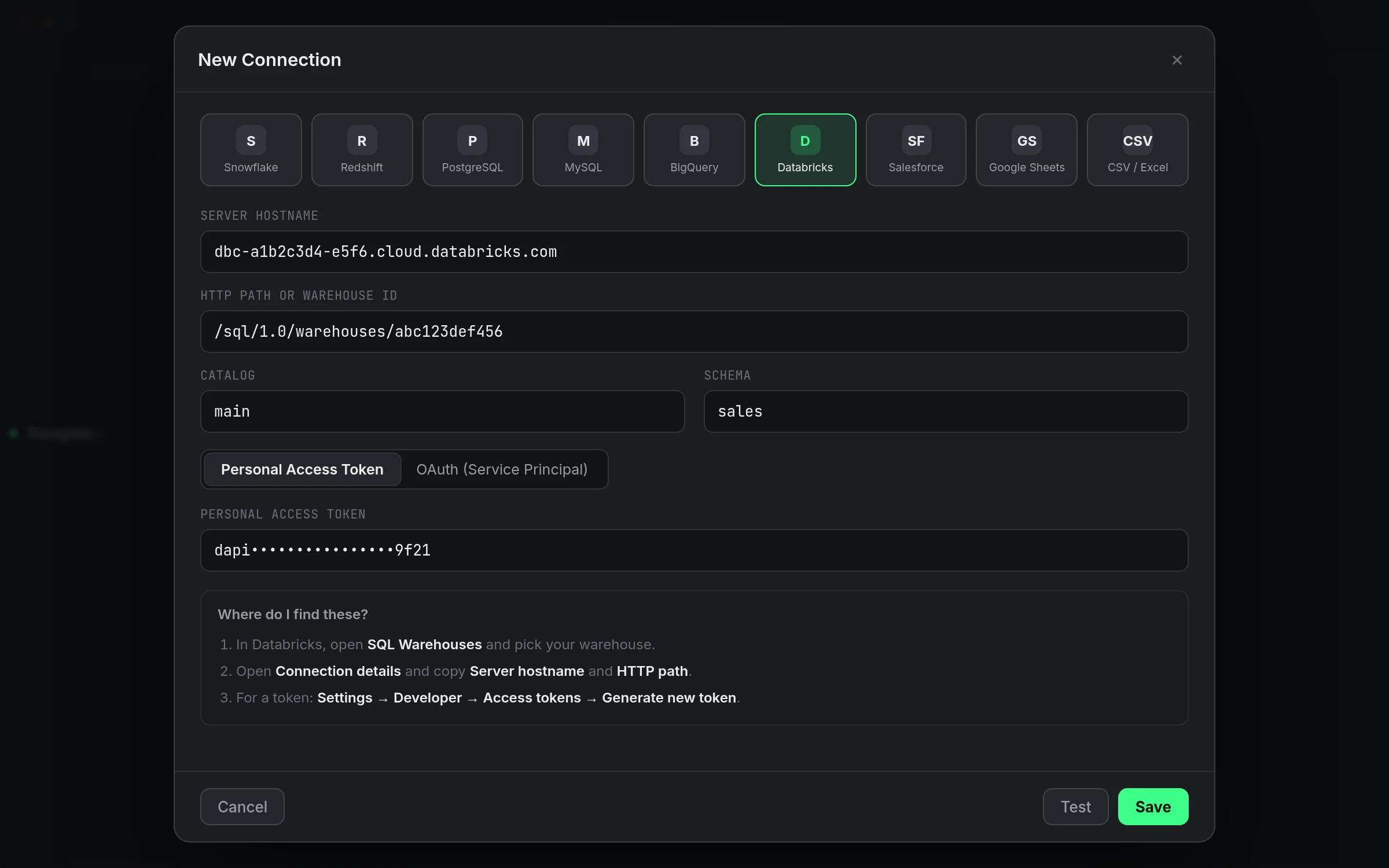
- Select Databricks from the provider grid.
- In Databricks, open SQL Warehouses, pick your warehouse, and open Connection details.
- Copy Server hostname into Server Hostname.
- Copy HTTP path into HTTP Path or Warehouse ID. A full URL works too.
- Optionally fill in Catalog and Schema.
- Under Authentication, choose Personal Access Token or OAuth (Service Principal).
- For a token: in Databricks go to Settings → Developer → Access tokens, click Generate new token, and paste it into Personal Access Token.
- For a service principal: paste its Client ID and Client Secret.
- Click Save.
Check it worked: click Test. The status dot turns green and the header reads "Connected" with a latency.
A stopped warehouse still accepts a connection test in some setups but times out on the first real query. If Test hangs longer than usual, start the warehouse from Databricks first.
A personal access token is the quicker route for your own connection: generate it once, paste it in, and you're querying. It's tied to your Databricks user, though, so it inherits whatever that user can see and it stops working if your account is deactivated. A service principal is the better choice for a connection a team relies on, or one a scheduled job depends on, because it isn't tied to a person who might leave or rotate their own credentials.
The Server Hostname and HTTP Path both come from the same Connection details panel on the warehouse's own page in Databricks, so it's worth having that tab open while you fill in the connection sheet rather than switching back and forth from memory. A pasted full URL is parsed for the path automatically, so you don't have to trim it down to just the path segment yourself.
Unity Catalog is supported without any extra setup: set a Catalog to scope the connection to one, or leave it blank and browse whatever your credential has access to by default. Up to 100,000 rows come back per query, and a Databricks result over 25 MB needs a LIMIT or fewer columns rather than pulling everything at once.
If something goes wrong
| If you see | Fix |
|---|---|
| Not authenticated with Databricks. Add a personal access token or OAuth client secret in connection settings. | Add a token or service principal credentials. |
| Databricks rejected the credentials. Re-check the personal access token or OAuth client secret. | Generate a fresh token. Old ones may be revoked. |
| Databricks denied access. Check permissions on the SQL warehouse. | Give the user or service principal access to that warehouse. |
| Databricks SQL warehouse not found or not running. Check the warehouse ID/HTTP path and that it's started. | Start the warehouse, then re-check the HTTP Path. |