Why no one's built this yet
Databricks has a solid browser-based SQL editor, so the pressure to build a native alternative has been lower than for, say, Postgres. But a browser tab still reloads your session, still gets buried under twenty other tabs, and still closes when your laptop sleeps mid-query. QueryFlow is a native Mac app: a Databricks connection sits in the same sidebar as your other warehouses, with the same fast startup and the same window that stays open.
What you get
- A Unity Catalog explorer. Catalogs, schemas and tables load in the sidebar, following the same three-level structure Databricks uses everywhere else.
- A SQL editor with real autocomplete. Suggestions come from your actual
catalog.schema.tablenames, not a generic guess. - An Ask panel on your own key. Bring an Anthropic, OpenAI, Google or xAI key and ask questions in plain English.
How it works
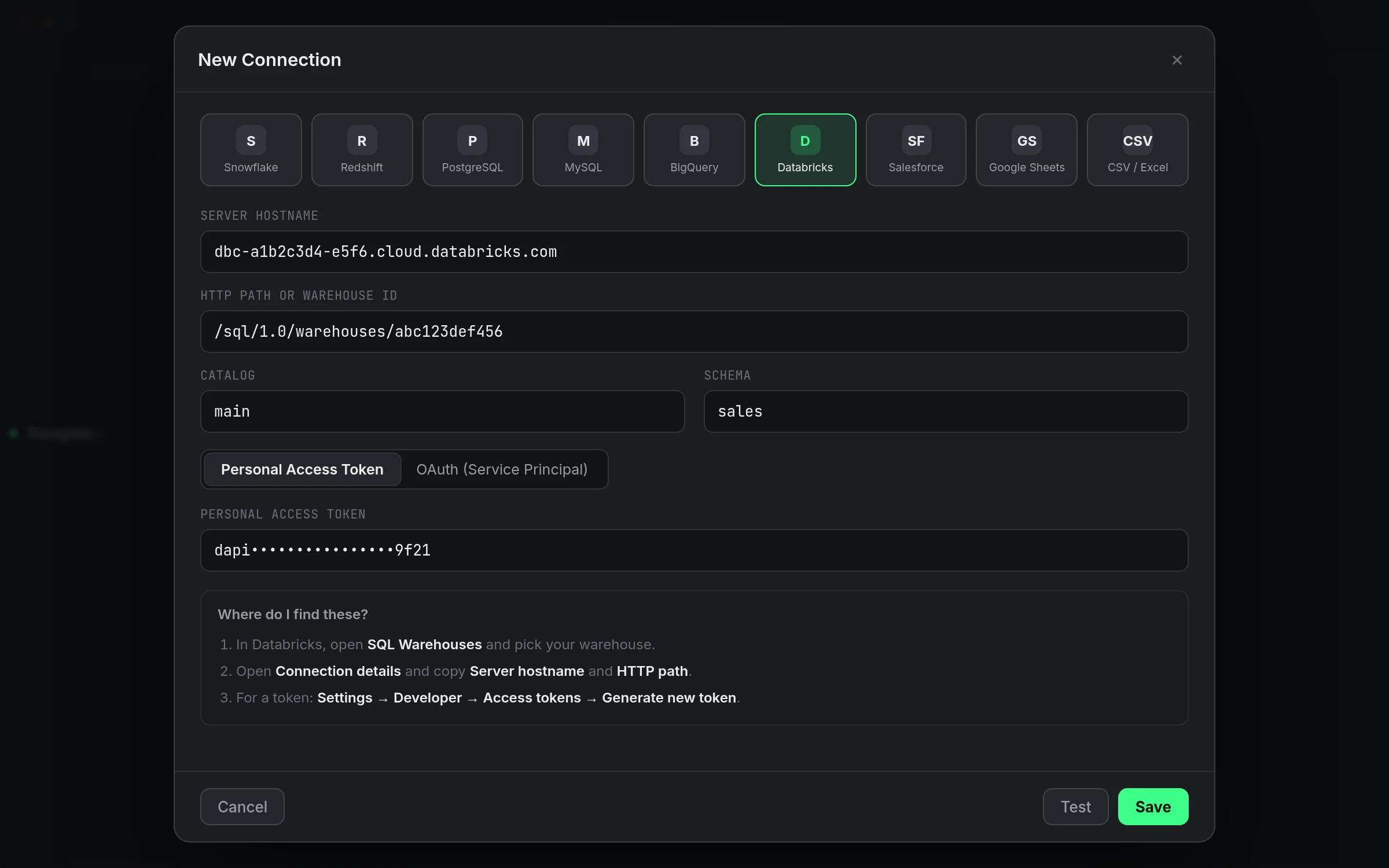
1. Connect. Click the + next to Databases, pick Databricks, and paste the Server Hostname and HTTP Path from your warehouse's Connection details. 2. Browse. Unity Catalog fills in the sidebar; right-click a table for a starting query. 3. Query. Write SQL, run it, or ask the panel to write it for you.
A worked query
Say you're checking daily active warehouses of a different kind, active sellers on a catalog you actually trust the naming on:
SELECT seller_region, COUNT(DISTINCT seller_id) AS active_sellers
FROM marketplace.gold.seller_activity
WHERE activity_date >= current_date() - interval 30 days
GROUP BY seller_region
ORDER BY active_sellers DESC;
Run it once, then Schedule it if you want it every morning, or Watch This if you just want to know when the number moves.
Credentials, kept on your Mac
Whether you connect with a personal access token or a service principal's client ID and secret, the credential lives in the macOS Keychain, not on a QueryFlow server. Delete the connection and it's wiped with it.
Studio vs. Pipelines
Querying, the explorer and the Ask panel are in Studio. Scheduling, Data Sync, and Watch This are Pipelines. See pricing for the full breakdown.
What this doesn't do
Results over 25 MB need a LIMIT or fewer columns, Databricks itself caps large result transfers, so a IDE, native or not, can't get around that. And the Ask panel needs your own Anthropic key under Settings, it isn't bundled in.
Editor details worth knowing
Inline completions trigger when you pause typing and fill in from both directions, not just left to right, and accept with Tab. The multi-tab workspace keeps a query against your gold layer open in one tab and a scratch query against silver in another, without either one losing its result set when you switch back and forth.
Working across more than one warehouse
If your team runs separate SQL warehouses for different workloads, add a connection per warehouse rather than one connection you keep repointing. Each shows up as its own entry in the sidebar with its own explorer, so you always know which warehouse a query is about to hit.
Naming connections so the sidebar makes sense
Give each connection a name describing what it is, not just the provider. Three entries all labeled "Databricks" is how a query lands against the wrong warehouse. Something like "Analytics (prod)" and "Analytics (dev)" costs ten seconds to set up and saves a mistake that costs a lot more to undo.
A note on latency
The latency shown next to a connected warehouse reflects the round trip to Databricks, not how long a query itself takes to run. A healthy latency and a two-minute query aren't a contradiction, they're two different measurements: one about reachability, one about the work the warehouse is doing.
A quick habit worth building
Before trusting a schedule against a new connection, run the query manually once first and check the row count against what you'd expect. It's a small step that catches a wrong catalog or an incomplete WHERE clause before it becomes a scheduled job quietly returning the wrong numbers every morning.
This costs a minute and saves an awkward conversation later about why a dashboard has been quietly wrong for a week.
A note on warehouse auto-stop while testing
If your SQL warehouse auto-stops after a period of inactivity, the first query after a while away can take longer while it spins back up. That's normal and not a sign the connection is broken, it's the warehouse resuming, and subsequent queries should return at the usual speed.