What an IDE gets you that a console tab doesn't
The BigQuery console is fine for a one-off query. It's less fine when you're running the same twelve queries every morning, keeping three tabs open so you don't lose your place, and re-authenticating every time the tab idles too long. An IDE means the schema stays visible while you type, your tabs persist across restarts, and closing your laptop lid doesn't lose a half-written query.
What you get
- An explorer that knows your project. Datasets, tables and columns load in the sidebar as soon as you connect, and you can filter by name instead of scrolling.
- A GoogleSQL editor, not a generic one. Backtick-quoted
project.dataset.tablepaths,UNNEST,ARRAY_AGGandSTRUCTall get real syntax highlighting and autocomplete. - An Ask panel on your own key. Bring an Anthropic, OpenAI, Google or xAI key and ask questions in plain English against your actual table names.
How it works
1. Connect. Click the + next to Databases, pick BigQuery, and sign in with Google or paste a service account JSON key. 2. Browse. The explorer fills in with your datasets and tables; right-click one for a starting SELECT * FROM [table] LIMIT 100. 3. Query. Write SQL, run it, and read the results in a native table, or ask the panel to write it for you.
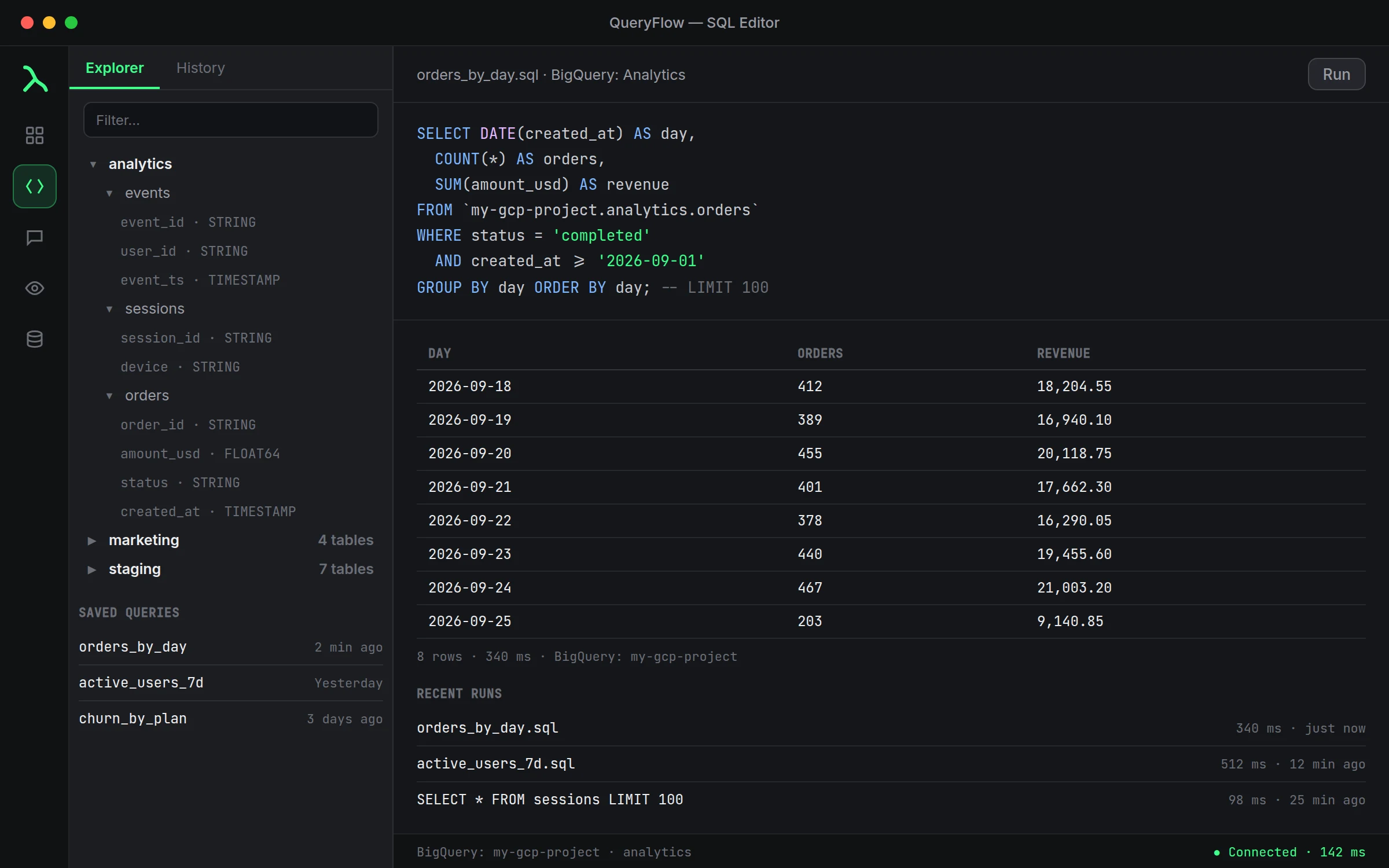
A worked query
Say you track daily active accounts in a table your data team actually named well. In the editor:
SELECT event_date, COUNT(DISTINCT account_id) AS dau
FROM `my-gcp-project.analytics.events`
WHERE event_date >= DATE_SUB(CURRENT_DATE(), INTERVAL 30 DAY)
GROUP BY event_date
ORDER BY event_date;
Run it once, then click Schedule if you want it every morning, or Watch This if you just want to know when the number moves. Both work directly against the connection you already added, no separate credentials.
Credentials, kept on your Mac
Whichever authentication method you pick, sign-in with Google or a service account key, the credential lives in the macOS Keychain, not on a QueryFlow server. Delete the connection and the credential is wiped with it.
Studio vs. Pipelines
Querying, the explorer, and the Ask panel are in Studio. Scheduling with output to S3, SFTP, a database, Slack or Teams, plus Data Sync and Watch This, are Pipelines. See pricing for the full breakdown.
What this doesn't do
This is a client, not a warehouse. It doesn't estimate query cost before you run something, so check BigQuery's own validator before hitting a table with a few billion rows. And the Ask panel needs your own Anthropic key under Settings, it doesn't come with one built in.
Editor details worth knowing
Inline completions trigger when you pause typing and fill in from both directions, not just left to right, so a suggestion can complete a WHERE clause even when you started with the GROUP BY. Accept one with Tab. The multi-tab workspace keeps a production query open in one tab and a scratch query in another without either losing its result set when you switch back and forth, which matters more than it sounds once a single-tab editor has cost you a half-written query.
Working across more than one project
If your work spans a few GCP projects, add a separate connection for each rather than forcing one connection to cover all of them. They show up as distinct entries in the sidebar, each with its own explorer, so you're never guessing which project a query is about to run against, or accidentally querying production when you meant staging.
A note on latency
The latency shown next to a connected project reflects the round trip to BigQuery's API, not how long a query itself will take. A connection can show a fast, healthy latency and still have a query run for two minutes against a large table; those are two different numbers measuring two different things, and conflating them is a common source of confused bug reports.
Renaming connections so the sidebar makes sense
Give each connection a name that says what it is, not just what provider it uses. Three entries all labeled "BigQuery" is how you end up running a query against the wrong project at 8 AM. Something like "Analytics (prod)" and "Analytics (staging)" costs ten seconds to type and saves you from a mistake that costs a lot more than ten seconds to undo.