What you get
No separate client for the warehouse a new project happens to use.
SQL editor, Explorer, Ask panel, Scheduler and Watches work the same on any connection.
Stored in the macOS Keychain, never on a QueryFlow server, wiped when you delete the connection.
Every connector, and how it connects
This is the whole list. Each one links to a full page for that warehouse or source.
| Connector | How it connects | Learn more |
|---|---|---|
| Snowflake | Username and password, or a personal access token, over Snowflake's SQL API v2. | Snowflake client |
| Redshift | IAM authentication over the Redshift Data API. No VPC tunnel or IP allowlist to manage. | Redshift client |
| PostgreSQL | Host, port, database, username and password, with SSL. | Postgres client |
| MySQL | Host, port, username and password. Works the same for RDS, Aurora, PlanetScale, MariaDB or local. | MySQL client |
| BigQuery | Sign in with Google, or a service account JSON key. | BigQuery client |
| Databricks | A personal access token, or a service principal (OAuth M2M), plus the warehouse's server hostname and HTTP path. | Databricks client |
| Salesforce | OAuth sign-in through Salesforce's own login screen. | Salesforce tools |
| Google Sheets | Sign in with Google and pick a spreadsheet. | Google Sheets sync |
| CSV / Excel files | Point at a file on disk. No server, no credentials to store. | File-based ETL |
How it works
- Add a connection. Click the + next to Databases, pick a provider from the tile grid, fill in its fields and click Save.
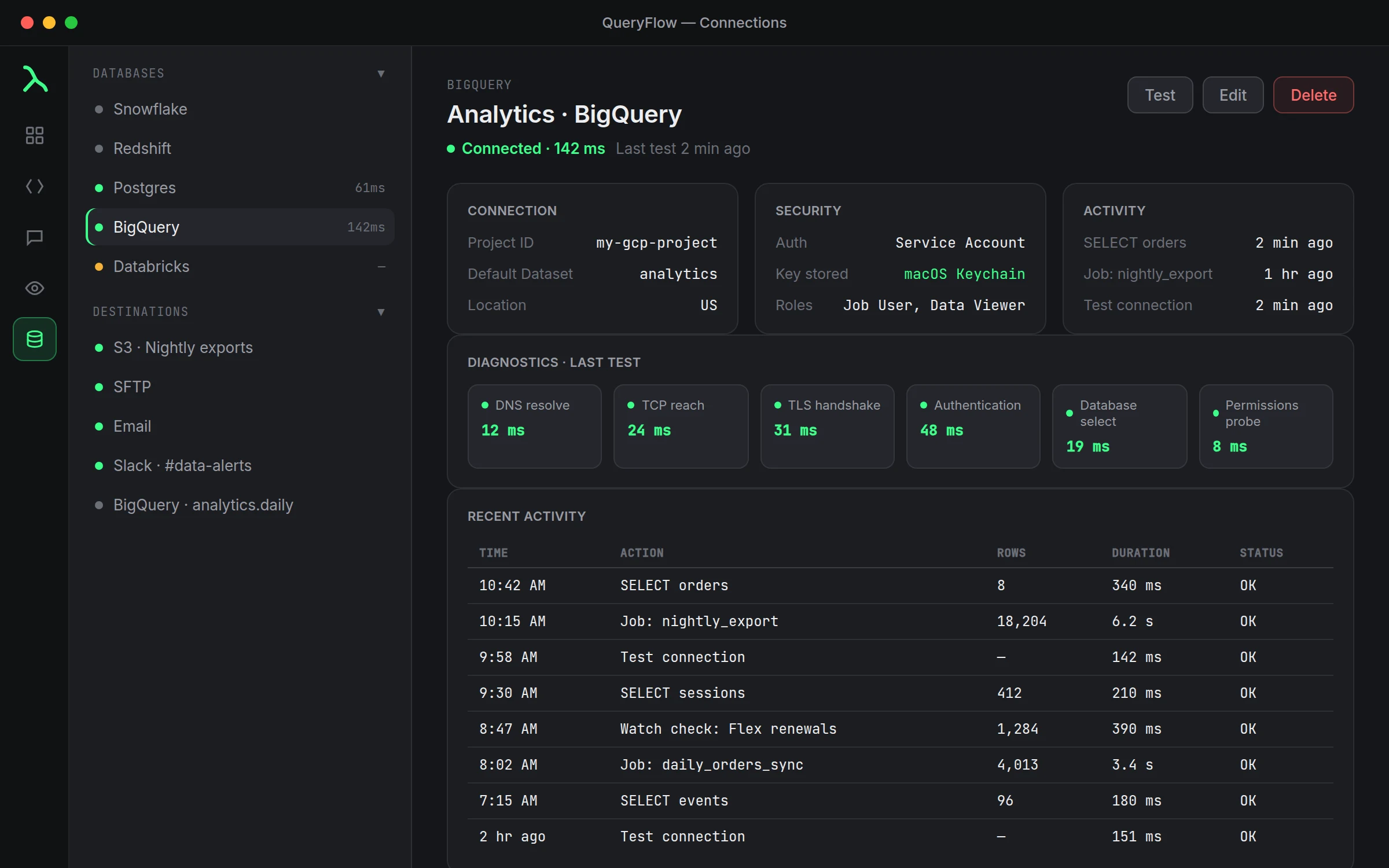
- Test it. The status dot goes green with a latency reading once it's live; a failed test opens the Diagnostics panel with a plain-language reason.
- Use it everywhere. The same connection shows up in the SQL editor, the Explorer, the Ask panel, the Scheduler and Watches, with no re-authentication step in between.
One app instead of five
The realistic alternative to a multi-warehouse client isn't one perfect tool per database, it's five different apps, five different keyboard shortcuts, and a query history split across all of them. If your Snowflake work lives in one tool, your BigQuery work in the Cloud Console, and your Postgres work in a third app, switching between them costs more attention than any of them individually.
A worked example: say you're reconciling a number between a Postgres table and a BigQuery table that's supposed to mirror it. In QueryFlow that's two tabs, one query each, same window:
-- Postgres tab
SELECT count(*) FROM public.orders WHERE created_at >= current_date - interval '1 day';

-- BigQuery tab
SELECT COUNT(*) FROM `analytics_prod.orders_mirror`
WHERE created_at >= TIMESTAMP_SUB(CURRENT_TIMESTAMP(), INTERVAL 1 DAY);
Same workspace, same result view, no context switch to a second application to run the second half of the comparison.
Studio or Pipelines
All nine connectors are available on both tiers. The split is about what you do with them once they're connected: querying, the Ask panel, and Flow Books are Studio. Scheduled jobs to most destinations, Data Sync, and Watch This alerts to Slack or Teams need Pipelines. See the full pricing breakdown for the exact line.
What this page is not
This is a map of the connectors, not a setup guide for any one of them. Each connector's own page and its knowledge base tutorial cover the actual fields and the errors you might hit. Start there once you know which warehouse you're adding.
The same header, whatever you connect
Every connection in the redesigned Connections screen opens to the same header: a name, a status dot, a last-tested time, and Test, Edit and Delete in one row. Details underneath are grouped into three cards, Connection, Security and Activity, so a BigQuery connection's cards look and behave the same as a Postgres one, even though what's inside them is different. That consistency is most of the point of a multi-warehouse client: you shouldn't have to relearn the interface every time a new project hands you a different database.
Hovering any row shows its latency in milliseconds, which is a fast way to notice a warehouse that's gotten slow to respond before it becomes a query that times out. A gray dot just means untested, not broken, worth clearing with a Test before you build a scheduled job on top of it.
Frequently asked
Do I have to pick one warehouse, or can QueryFlow connect to several at once?
Several at once. Add as many connections as you have databases; they all sit in the same sidebar and you switch between them with a click.
Does adding a connector cost extra?
No. All nine connectors are included in Studio and Pipelines; the tiers differ on scheduling, Data Sync and alert destinations, not on which databases you can connect to.
Can I query two different connections in the same window?
Yes, each open tab is tied to whichever connection you picked for it, so a Postgres tab and a BigQuery tab can sit side by side.
Where do my credentials get stored?
In the macOS Keychain on your own Mac, never on a QueryFlow server, and they're removed when you delete the connection. See Where your database passwords live for the details.