Same Ask panel, now pointed at Databricks
QueryFlow's Ask panel isn't a separate Databricks-only tool bolted onto the side. It's the same panel that works against Snowflake and Postgres, now aware of whatever catalogs and schemas your Databricks connection can see. Ask it something and it explores your tables the way you would, then hands the SQL to whichever model you've picked to write the final answer.
A worked example
Suppose you're a data analyst on the marketing team and someone asks in Slack, "did the new landing page hurt trial signups this week." You open the Ask panel and type roughly that. It looks at your schema, finds your events and signups tables, and comes back with something like:
SELECT date_trunc('day', signed_up_at) AS day, COUNT(*) AS trials
FROM marketing.gold.trial_signups
WHERE signed_up_at >= current_date - interval 14 days
GROUP BY 1
ORDER BY 1;
One sentence up top ("trial signups dipped about 9% the two days after the page changed, then recovered"), the SQL underneath, and a Continue button if it needs more room to dig further. You didn't have to remember the table was named trial_signups and not signups, or that it lives under marketing.gold instead of marketing.raw.
Step cards, so you know what it looked at
Every answer comes with step cards showing exactly what the panel checked: which tables, which columns, which prior result it pulled from. It works within a 30-step budget per question, which is usually plenty for exploring a couple of related tables in a Databricks schema. If it needs more, a Continue button appears instead of it just guessing.
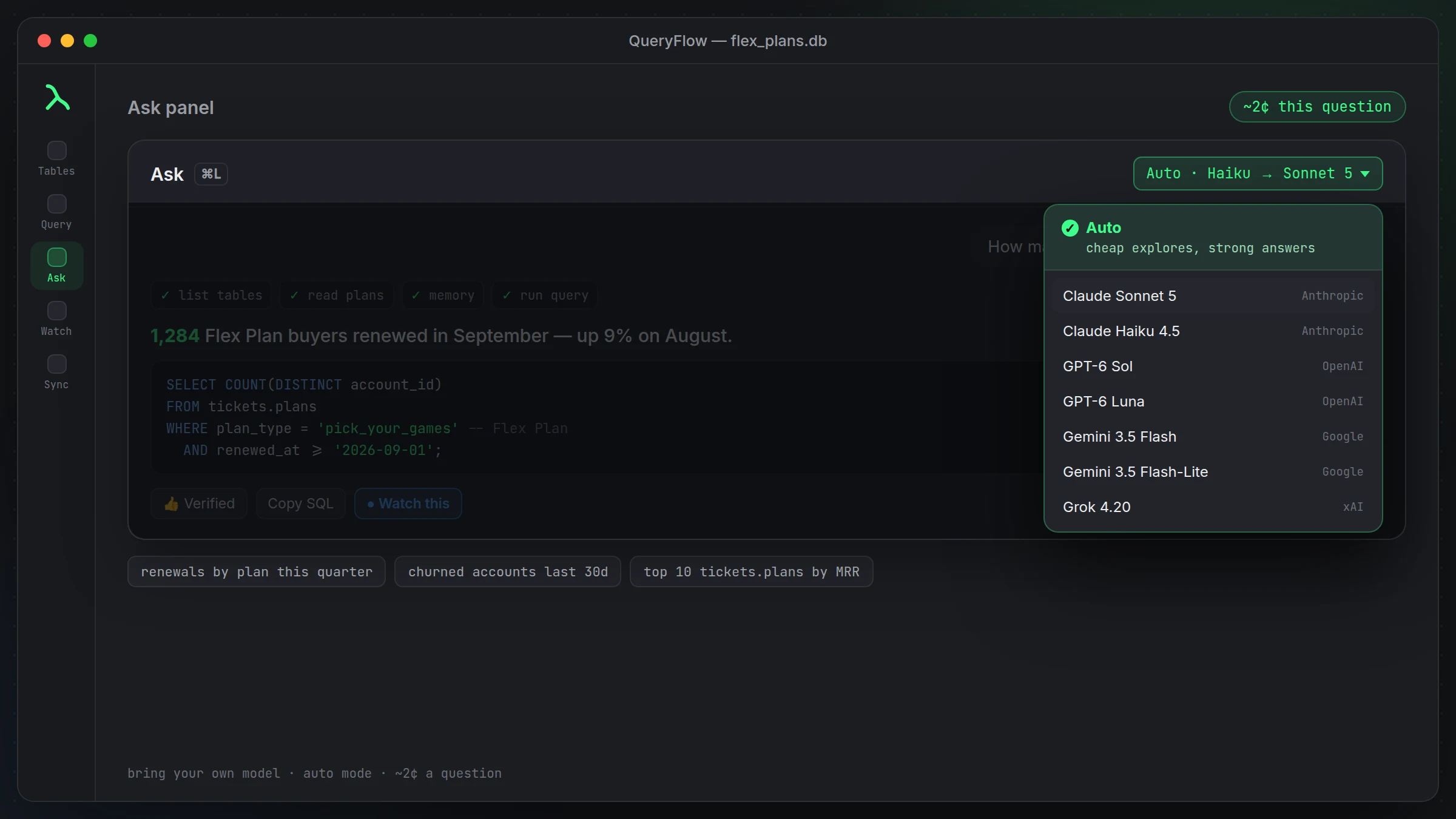
Bring your own model, bring your own key
You pick the model: Claude Sonnet 5, Claude Haiku 4.5, GPT-6 Sol, GPT-6 Luna, Gemini 3.5 Flash, Gemini 3.5 Flash-Lite, or Grok 4.20. Add the provider's key in Settings and QueryFlow sends your question straight to them, no markup, no separate AI subscription. Typical cost is around 2 cents a question. Auto mode uses a cheap model to explore your schema first, then hands off to a stronger model for the final answer, which keeps cost down on wider exploratory sessions.
Teaching it your schema's vocabulary
Databricks catalogs tend to accumulate naming that only makes sense if you were there when it was built. If "gold.subs" means something specific to your team, thumbs-up a good answer to turn it into a verified query, or explicitly teach a term the way you'd explain it to a new hire. See teaching the Ask panel your business terms for the full mechanics.
One sentence by default, more when you ask
Answers default to one sentence plus the SQL. Type /brief for even shorter, or /verbose when you actually want to see the reasoning and every step it took, which is useful the first few times you point it at an unfamiliar catalog and want to sanity-check its exploration.
Where this doesn't help
It writes queries against tables it can see through your connection. It doesn't understand business context that isn't reflected in your schema or that you haven't taught it, and it won't catch a wrong assumption baked into how a table was built. Treat the SQL it writes the way you'd treat a query from a capable but new teammate: read it before you run it against anything that matters.
A second example, with a join
The single-table example above is the easy case. Ask something that spans two tables and you see the same behavior at more depth. "Which customers upgraded but haven't logged in this week" against a Databricks warehouse with separate subscriptions and login_events tables might produce:
SELECT s.customer_id
FROM growth.gold.subscriptions s
LEFT JOIN growth.gold.login_events l
  ON l.customer_id = s.customer_id
  AND l.event_time >= current_date - interval 7 days
WHERE s.plan_changed_at >= current_date - interval 30 days
  AND s.change_type = 'upgrade'
  AND l.customer_id IS NULL;
The step cards under that answer show it checked both tables and the join condition before settling on a left join with a null check, which is the part worth glancing at, since a join written slightly wrong here would silently return the wrong list of customers rather than erroring out.
Cost of running this alongside your existing tools
You're not paying twice for compute. QueryFlow's queries run against your existing Databricks SQL warehouse the same way any other client's would, so the cost profile is whatever your warehouse already charges for the compute it uses, not something new layered on top. The only added cost is the AI model usage if you use the Ask panel, and that's billed by the provider on your own key, separate from anything Databricks charges.
Building trust in what it hands you
The first few times you use this against a schema you know well, take the extra thirty seconds to actually read the SQL before running it, not because it's usually wrong, but because that's how you learn which kinds of questions it handles cleanly on the first try and which ones need a follow-up nudge. After a week or two of normal use, most people settle into trusting the routine cases on sight and reading closely only for anything with a join or a date boundary that matters.
A note on latency
A question against a warehouse you haven't queried yet in this session takes a little longer than a follow-up, since the panel has more schema to check the first time. Once it has context on a catalog, related questions in the same session tend to come back faster. This is worth knowing before you judge speed off a single first question against a brand-new connection.
Connecting before you ask
The Ask panel works against whichever Databricks connection you've already added, a personal access token or a service principal, credentials kept in the macOS Keychain, and it reads whatever catalogs and schemas Unity Catalog exposes to that credential. As of 1.7, the same connection also works as a Data Sync target with Insert, Update or Upsert, so a query the panel writes can feed a sync, not just a one-off answer. See the Connect Databricks tutorial and the Databricks IDE for Mac.