GoogleSQL, written for you, shown to you
BigQuery's own SQL dialect has enough quirks, backtick-quoted table paths, UNNEST for arrays, STRUCT fields, that switching between it and standard SQL all day is its own small tax. The Ask panel writes GoogleSQL directly, using your project's actual dataset and table names, and shows you the query before you run it. You're not trusting a black box; you're reading a query the way you'd read one a colleague handed you.
A worked example
Say you run analytics for an ecommerce team and someone in standup asks "what were our top 10 products by revenue last week." You type that into the Ask panel, and against a project called acme-warehouse it comes back with something like:
SELECT p.product_name, SUM(o.line_total) AS revenue
FROM `acme-warehouse.analytics.order_items` o
JOIN `acme-warehouse.analytics.products` p
  ON p.product_id = o.product_id
WHERE o.order_date >= DATE_SUB(CURRENT_DATE(), INTERVAL 7 DAY)
GROUP BY p.product_name
ORDER BY revenue DESC
LIMIT 10;
You get one sentence ("candles and the gift-wrap add-on led last week, together about a third of revenue") plus that query, ready to run or adjust. If you wanted last month instead, you'd just say so and it rewrites the date filter.
Step cards for a query you didn't write
Every answer shows step cards for what it actually checked, which datasets, which tables, which columns, before it settled on a query. That matters more on BigQuery than most warehouses, because a wrong join across a big table isn't just a wrong answer, it's a query that scans more data than it needed to. Seeing the steps lets you catch that before you run anything expensive.
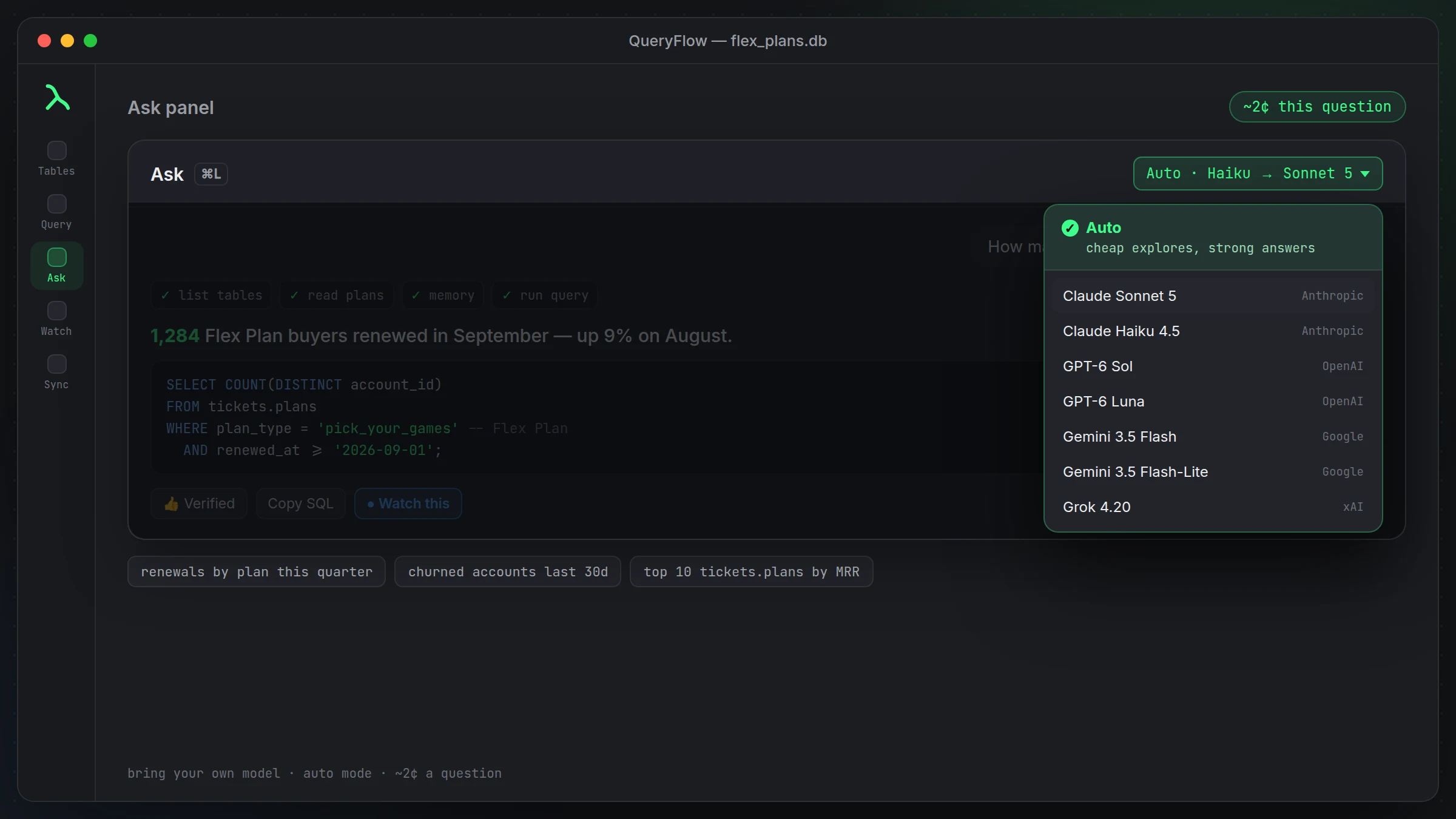
Pick the model, pick the cost
Claude Sonnet 5, Claude Haiku 4.5, GPT-6 Sol, GPT-6 Luna, Gemini 3.5 Flash, Gemini 3.5 Flash-Lite, or Grok 4.20, on whichever provider's key you already have. Auto mode sends the exploration (reading table structure, sampling recent rows) to a cheap model first, then a stronger model writes the final query, so you're not paying frontier rates to find out a table exists.
Memory for a dataset with its own dialect of names
If your BigQuery datasets have internal naming that outsiders wouldn't guess, teach the panel once. Thumbs-up a good answer to make it a verified query it can reuse, or explain a term directly, the way you would to someone joining the team. See teaching it your business terms for how that works day to day.
What it won't do
It writes queries against the datasets your connection can see. It doesn't estimate bytes scanned or query cost for you, and it isn't a substitute for checking a query's execution details on anything you're about to run at scale. If a question is really about cost control rather than getting an answer, that's a job for BigQuery's own query validator and your team's judgment, not the Ask panel.
A second example, across two datasets
Real questions usually span more than one table. Ask "which customers have an open support ticket and spent over $500 last quarter" and, against a warehouse with separate support and analytics datasets, you might get:
SELECT c.customer_id, c.email
FROM `acme-warehouse.analytics.customers` c
JOIN `acme-warehouse.analytics.orders` o
  ON o.customer_id = c.customer_id
JOIN `acme-warehouse.support.tickets` t
  ON t.customer_id = c.customer_id
WHERE t.status = 'OPEN'
  AND o.order_date >= DATE_SUB(CURRENT_DATE(), INTERVAL 3 MONTH)
GROUP BY c.customer_id, c.email
HAVING SUM(o.line_total) > 500;
Notice it joined across two datasets, analytics and support, without you having to specify the fully-qualified paths yourself. That's the part that actually saves time on BigQuery specifically, where dataset boundaries tend to multiply as an organization grows.
Why this matters more on BigQuery than some warehouses
BigQuery organizations tend to spread data across more datasets than a single-database warehouse would, partly because of how billing and access controls are scoped per dataset. That's good practice for cost isolation, but it means the person asking a question often doesn't know, or shouldn't need to know, which of six datasets actually holds the answer. Reading across that structure for you is one of the more useful things the Ask panel does here, compared to just being a slightly faster way to type a query you already knew how to write.
A note on cost awareness
Since BigQuery charges by bytes scanned, it's worth developing a habit of glancing at which tables a generated query touches, especially on a first pass against a dataset you don't use often. A query that joins three large fact tables without a date filter can scan a lot more than the question actually needed. Adding a date range to your question ("last 7 days" rather than leaving it open-ended) usually produces a narrower, cheaper query without you having to edit the SQL afterward.
Reading the query before you run it
This is worth repeating because it's the single habit that matters most: read the SQL before you run it, especially the WHERE clause and the join conditions. A generated query that's subtly too broad, missing a date filter, joining on the wrong key, isn't rare enough to skip checking, and on a warehouse that bills by data scanned, a too-broad query costs more than a wrong answer usually would elsewhere.
Where it sits alongside your own SQL habits
Nothing here replaces knowing GoogleSQL yourself. The panel is a faster path to a query you could eventually have written on your own, not a way around understanding what your data actually looks like. Analysts who already know BigQuery well tend to use it for the tedious lookups and lean on their own SQL for anything genuinely novel; that split seems to hold up regardless of experience level.
Connecting before you ask
The Ask panel works against whichever BigQuery connection you've already added, signed in with Google or a service account key, credentials kept in the macOS Keychain. As of 1.7, the same connection also works as a Data Sync target, so a query the panel writes can feed straight into a sync or a scheduled job, not just a one-off answer. See the Connect BigQuery tutorial and the BigQuery IDE for Mac for the full picture.