The problem, restated plainly
You run a query. The number it returns matters, a row count, a total, whether a flag flipped. The next morning you run it again, because the only way to know if it changed is to look. Do that enough times and one of two things happens. Either you keep re-running the same query by hand, forever, or someone on the team decides this deserves a real BI stack: a hosted dashboard tool, a scheduled job, a notification integration, all of it wired up to answer one question that used to take ten seconds to ask.
Neither option is wrong, exactly. Re-running a query by hand is fine until you forget one morning and miss the thing that mattered. Standing up a BI platform is fine until you realize you built a server to watch a single number. What's missing is the space in between: watch this one query, tell me only when it changes, and don't make me run infrastructure to do it.
The public record
This isn't a gap we noticed alone. It shows up, dated and in public, everywhere people already work with SQL. Below are the verified threads: people asking a desktop SQL IDE, or an open-source BI tool, for some version of "tell me when this query's result changes." Each card links to the original thread. We describe what actually happened to each request, including the ones that got a partial answer.
Wanted an audible ping when a query finished running.
View thread →Wanted distinct sounds per outcome for an unattended batch.
View thread →Wanted a SQL script to run on its own schedule.
This one ended in DBeaver Enterprise's paid Task Scheduler, which runs a script or export on a schedule. It doesn't compare one run's result to the last or alert on a difference.
View thread →Wanted alert thresholds computed from a prior query's values.
View thread →Wanted a system notification when a long query finished.
View thread →Same ask as DBE-1221, filed as a separate ticket.
View thread →Wanted to subscribe to a query and get notified on change.
View thread →Wanted visibility into failing or heavily-used scheduled queries.
View thread →Wanted to be notified when a query finished running.
View thread →Wanted a Slack alert when new rows appeared.
View thread →What desktop SQL IDEs offer today
We checked, honestly, rather than assuming the field was empty. DBeaver, DataGrip, TablePlus, Postico, Beekeeper Studio, Azure Data Studio, and pgAdmin have no feature that compares a query's result across runs and tells you when it changes. DbVisualizer comes the closest with its Monitored Query feature: it re-runs a query on an interval and refreshes a grid or chart inside the open window. That's a real, useful feature, and it's more than most IDEs offer. It stops at the edge of the app, though: it only updates while DbVisualizer is open and its Monitor window is active, and it has no email, Slack, or Teams notification.
QueryFlow is the only desktop SQL IDE we found where you can watch a query and get pinged in Slack or Teams when the result changes. That's a specific, bounded claim, scoped to desktop SQL IDEs and to alerts delivered outside the app, and it's the gap the timeline above documents from the outside.
How Watch This actually works
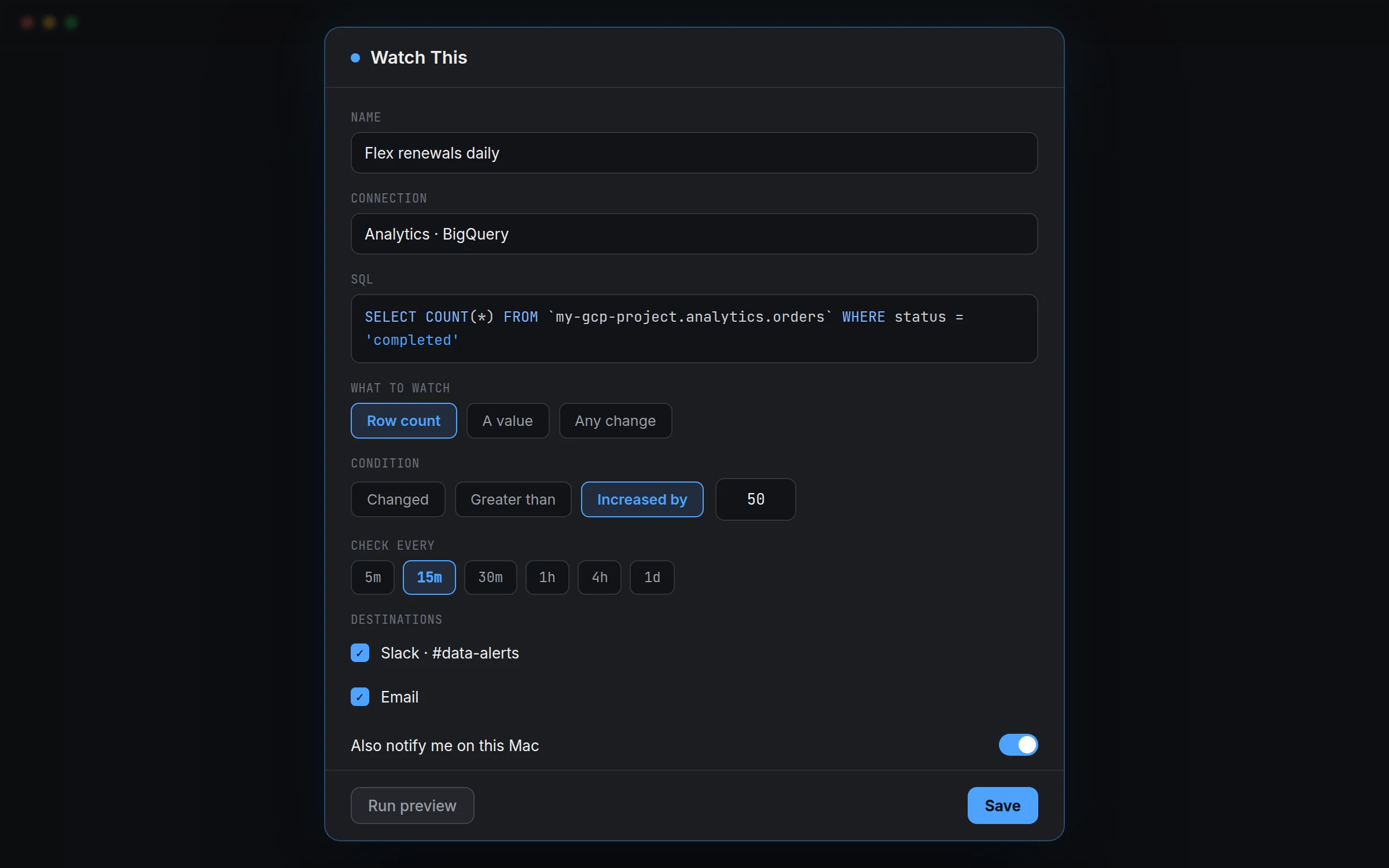
Run a query in the SQL Editor, or get an answer from the Ask panel, then click Watch this. Give it a name and confirm the connection and SQL. Choose what to watch: Row count, A value (then pick the column), or Any change, which compares the whole result set rather than a single number. Pick a condition: Changed, Greater than, Less than, Equals, Increased by, or Decreased by. Set Check every to 5m, 15m, 30m, 1h, 4h, or 1d. Under Destinations, tick where the alert should land: Slack, Microsoft Teams, email, a webhook, or a native macOS notification. Click Run preview, then Save.
Watches run through QueryFlow's background helper, so they keep checking with the main app closed, within the documented limits for that connector. All of your watches live under WATCHES in the Pipelines sidebar, where right-clicking one gives you Check now, Edit, or Delete.
Wanted it too
To be direct about the record above: it isn't a story about Chris personally filing feature requests for years and finally giving up and building the thing. It's a story about people who have nothing to do with QueryFlow, on Hacker News, in DBeaver's issue tracker, on Redash and Metabase forums, independently asking for close variations of the same capability, over close to a decade. We ran into the same wall at work: a query mattered, checking it by hand got old, and building a BI stack for one alert felt like the wrong amount of infrastructure. Watch This is what we built to close that gap for ourselves. The public record above says we weren't the only ones who wanted it.
What's next
We keep a public board for exactly this kind of request, the next feature people are asking for before we've built it. If there's something QueryFlow doesn't do yet that you keep working around, that's the place to say so.