What Task Scheduler actually does
DBeaver Enterprise's Task Scheduler is a real feature, not a gimmick. You point it at a query, a script, or an export job, give it a cron-style schedule, and it runs unattended. That part works fine, and it's genuinely useful for nightly exports or routine housekeeping. Where it stops is comparison: Task Scheduler has no concept of "this result is different from the one before it." It runs the job. What you do with the output, opening the export, reading a log, is on you.
What DBeaver users have actually asked for
This isn't a hypothetical gap. DBeaver's GitHub issue tracker has open requests along these lines, including #405 and #546, both asking for something like an audible ping when a query finishes running. That's already a narrower ask than what most people actually want, which is "tell me when the answer to this query is different," not just "tell me the query is done." Neither has shipped as a built-in feature.
A concrete case: a daily signups check
Say you run this every morning in DBeaver against Postgres, to sanity-check that signups didn't fall off overnight:
SELECT COUNT(*) AS signups
FROM public.users
WHERE created_at >= CURRENT_DATE - INTERVAL '1 day';
In DBeaver, checking this daily means opening the tab, re-running the query, and eyeballing the number against yesterday's, either from memory or a scrap of paper. Task Scheduler can run it and export a CSV each morning, but you still have to open that CSV and compare it yourself. There's no step where DBeaver looks at today's 4 and yesterday's 340 and tells you something is wrong.
The same query, watched instead of scheduled
In QueryFlow, you run the same query once, click Watch this in the results header, and set it up:
- Watch: A value, column
signups - Condition: Decreased by, threshold set to whatever a real drop looks like for your team
- Check every: 1h
- Destination: Slack, channel
#data-alerts
The alert that lands in Slack reads something like: "Watch 'Daily signups' — signups decreased by 336 (was 340, now 4). Checked at 8:00 AM." Nobody opened a tab. Nobody compared a CSV to yesterday's CSV by hand.
Where DBeaver still wins
DBeaver supports well over 50 databases through JDBC, versus QueryFlow's nine native connectors (Snowflake, Redshift, PostgreSQL, MySQL, BigQuery, Databricks, Salesforce, Google Sheets, CSV/Excel). If your work touches Oracle, Cassandra, or something more obscure, DBeaver remains the tool that can actually reach it. Task Scheduler's export-and-email pattern is also genuinely handy for routine file drops that nobody needs to react to in real time, that's a job Watch This isn't built for either.
Setting up your own Watch, step by step
Run or open the query in the SQL Editor, or get an answer in the Ask panel, then click Watch this. Give it a name and confirm the connection and SQL. Choose what to watch: Row count, A value (then pick the column), or Any change. Pick a condition: Changed, Greater than, Less than, Equals, Increased by, or Decreased by. Set Check every to 5m, 15m, 30m, 1h, 4h, or 1d. Under Destinations, tick where alerts go, then click Run preview and Save. See the full Watch This tutorial for the walkthrough with screenshots.
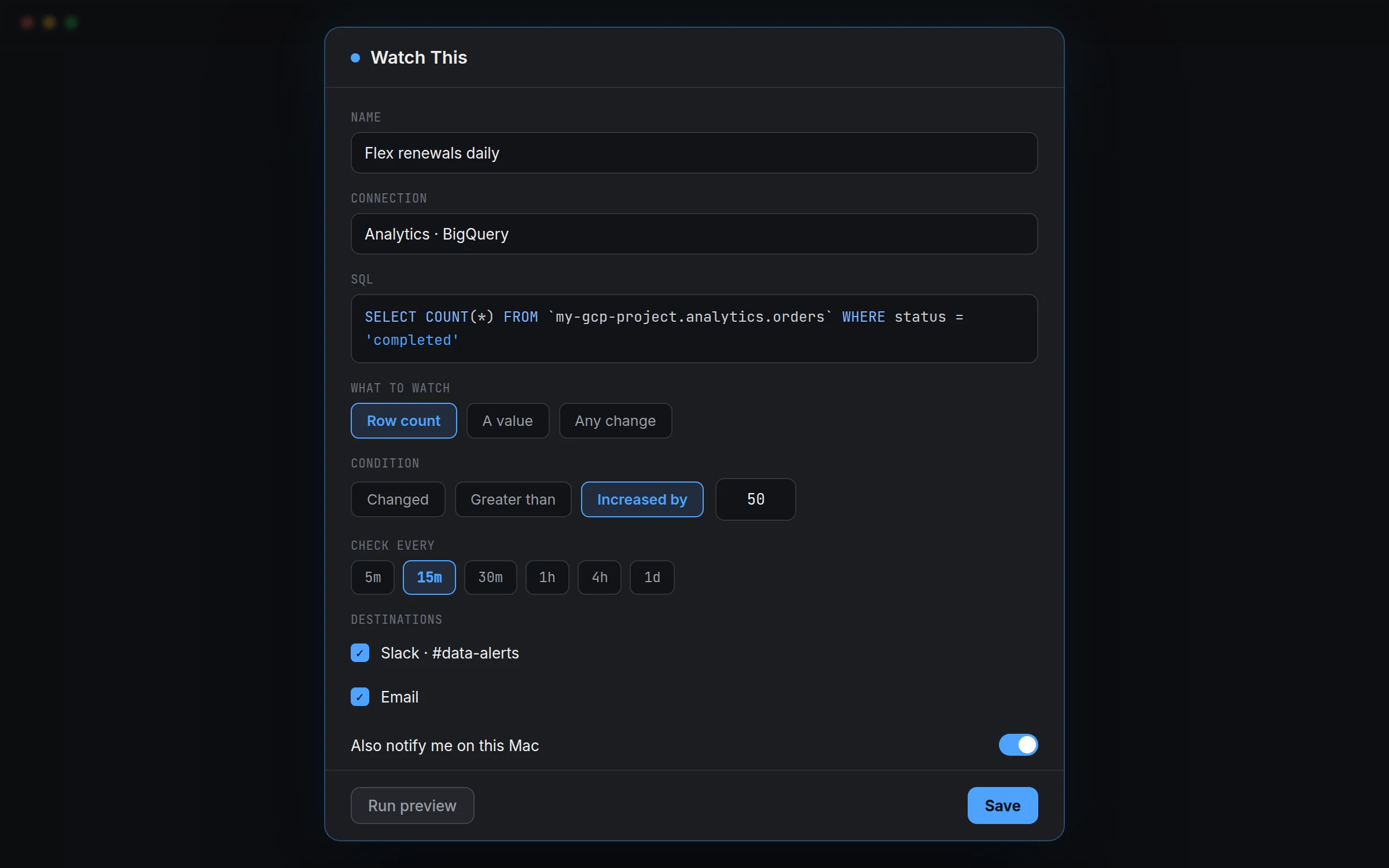
Watching Any change, not just a single number
Row count and A value cover most cases, but sometimes the thing worth catching isn't a single number, it's the shape of the whole result. If you're watching a small lookup table, say a list of active feature flags, choose Any change instead of Row count or A value. QueryFlow compares the entire result set to the previous check, so a flag flipping from true to false shows up even though the row count never moved. That's a case Task Scheduler's export-and-email pattern would miss entirely, since it has nothing to diff against in the first place.
Running the same query as a scheduled job instead
Not every query needs to be watched for change, some just need to run and land somewhere on a schedule, which is closer to what Task Scheduler is actually built for. QueryFlow's Scheduler covers that case too: pick Manual, Interval, Daily, Weekly, or Custom Cron under Schedule, choose an output (Save to File, Email, or on Pipelines, SFTP, S3, a database, Google Sheets, Slack, or Teams), and turn on Enable immediately. The difference from a Watch is that a scheduled job runs and delivers every time, whether or not anything changed; a Watch only speaks up when the condition you set actually fires. Use the Scheduler for a routine export, and Watch This for the question you only want answered when the answer is interesting.