What you get
- Drag to map — connect a source field to a target field with a line, no dropdown-per-column.
- AI Map for the obvious ones — auto-match fields by name, then fix the handful that need it by hand.
- Dry Run before it writes: preview the mapping against real rows before anything lands in the target.
How it works
Open Pipelines → Build and click New Sync. Pick the source Connection and Table on the left (or write SQL instead of picking a table directly), and the target Connection and Table on the right. Drag from a source field to its target field to create a mapping, or click AI Map to have QueryFlow match fields by name automatically, then adjust anything it got wrong.
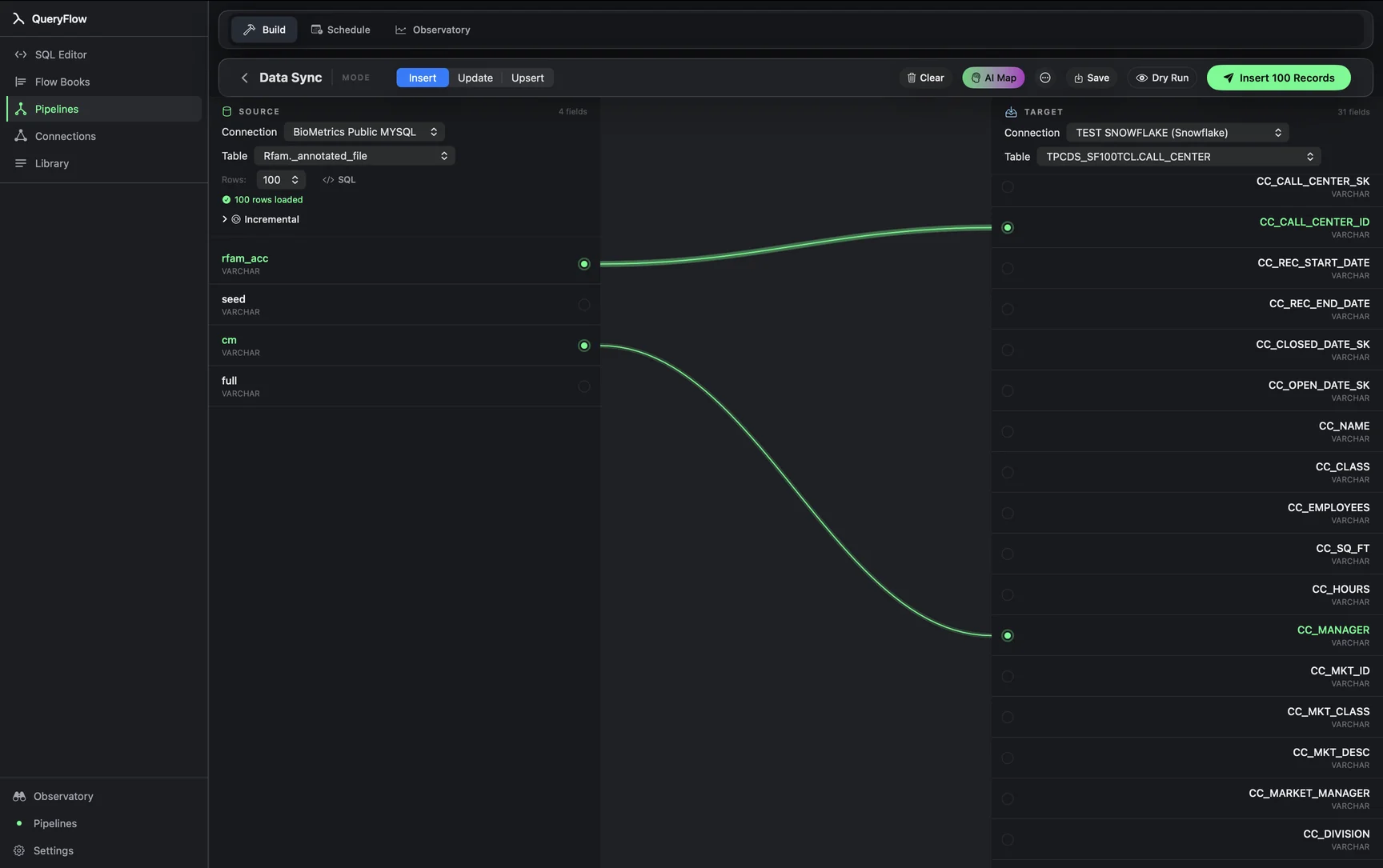
Say you're mapping a Postgres customers table into a BigQuery table with slightly different column names:
-- source (Postgres)
customer_id, full_name, email_address, created_at

-- target (BigQuery: my-gcp-project.crm.customers)
id, name, email, signup_date
AI Map will likely catch email_address → email without help, but full_name → name and created_at → signup_date are exactly the kind of near-miss you'd still want to eyeball and confirm by hand, or drag yourself if AI Map skips them.
Pick a mode once the fields are mapped
Once fields are mapped, choose a MODE: Insert for straightforward appends, or Update or Upsert when rows need to land on top of existing ones. Update and Upsert need a MATCH ON field whose values are unique per row, usually the primary key. Click Dry Run to preview what would happen without writing anything, then Save it as a scheduled job or run it immediately.
Studio vs Pipelines
Data Sync and its field mapper are Pipelines-tier. Studio covers the SQL editor, connections, and scheduling with file and email output; moving data between two connections with a visual mapper is part of Pipelines. See pricing for the full breakdown.
What it isn't
This isn't a schema-migration tool that creates and alters target tables for you. The target table needs to already exist with the columns you're mapping into. If you're starting from nothing, create the target table first, then come back and map into it.
Mapping across different data types
A line between two fields doesn't guarantee their types match. Mapping a Postgres timestamp column to a Databricks date column, for instance, works but silently drops the time-of-day portion. QueryFlow doesn't block a mapping over a type mismatch; it moves the data and coerces where it reasonably can. Dry Run is the place to catch a coercion you didn't intend before it happens on every future run of the job.
Re-mapping after a schema change
When a source table gains a new column, or a target table's column gets renamed, an existing mapping doesn't update itself. Open the sync, and the field list reflects the current schema; add a new line for the new column, or re-drag the line that pointed at the old name. It's a manual step by design, since silently guessing at a renamed column's new identity is exactly the kind of surprise a data pipeline shouldn't produce on its own.
Mapping more fields than you need
It's tempting to map every available source field just because AI Map offers to. A leaner mapping, only the columns the target actually uses, tends to age better: fewer fields to notice breaking when a source schema changes, and a clearer picture at a glance of what data is actually flowing between the two systems. Unmapped source fields are simply left alone; nothing about leaving one out causes an error.
Field mapping as documentation
A saved sync with its field mapping intact doubles as a record of exactly which source columns feed which target columns, which is more precise than a written data dictionary that tends to drift out of date. Six months later, opening the sync and looking at the mapped lines answers "where does this column's data actually come from" more reliably than asking around.
When to skip the mapper entirely
For a source and target that already share identical column names and types, spelling out a query with matching aliases can sometimes be faster than opening the visual mapper at all. The mapper earns its place once names diverge, types need light coercion, or you'd rather see the relationship drawn out visually than trust a mental match between two column lists.