What it's actually for
Most of the SQL you write in a day isn't complicated, it's just tedious to remember. Which table has the field you need, whether it's called customer_id or cust_id this time, whether that join needs a distinct or you'll double-count something. The Ask panel exists for exactly that class of question: not a replacement for knowing SQL, a way to skip the part where you're hunting for a column name instead of thinking about the actual question.
Opening it and asking something
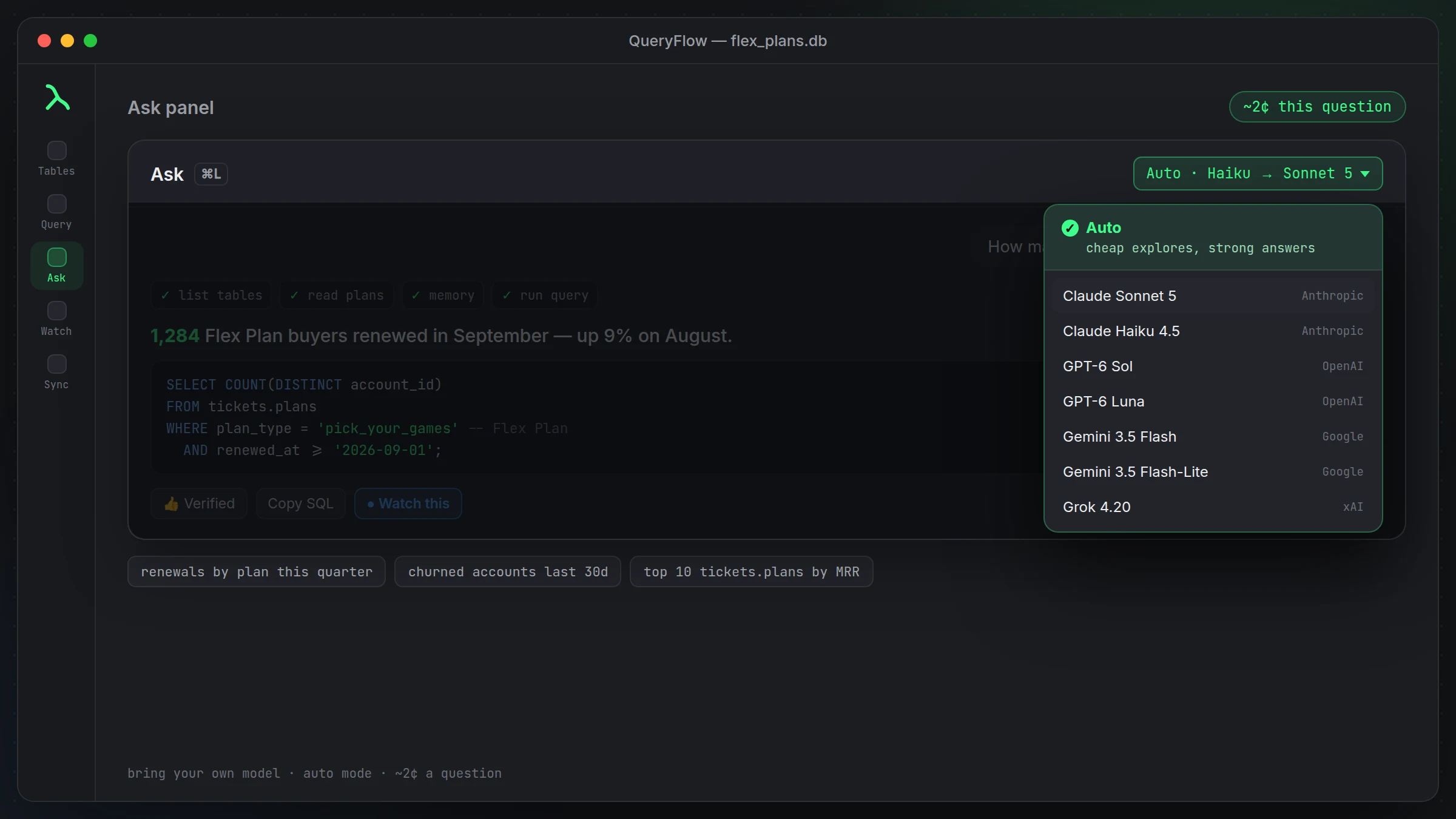
Cmd-L opens the panel from anywhere in the workspace. Type a question, hit Return, and it goes to work. Say you're looking at a Postgres database for a subscription business and you type "how many customers upgraded plans last month." It reads your schema, finds the relevant tables, and comes back with something like:
SELECT COUNT(*) AS upgrades
FROM public.plan_changes
WHERE change_type = 'upgrade'
  AND changed_at >= date_trunc('month', now()) - interval '1 month'
  AND changed_at < date_trunc('month', now());
One sentence at the top ("143 customers upgraded last month, most of them from Starter to Pro"), the query underneath, ready to run again or adjust. You didn't need to know the table was called plan_changes rather than subscription_events.
Step cards, so you're not trusting a black box
Every answer shows step cards for what it actually checked: which tables it looked at, which columns, which prior results it used. It works within a 30-step budget per question, which covers most reasonable exploration of a couple of related tables. If it needs more room, a Continue button appears rather than the panel just cutting corners to finish.
Adaptive prompt chips
Instead of generic example prompts, the chips under the panel are built from your real table and column names, so the suggestions actually make sense for the database you're connected to rather than a demo schema nobody has.
Controlling how much you see
Answers default to one sentence plus the SQL. Type /brief for even shorter, or /verbose when you want the full reasoning and every step, which is worth doing the first few times you point it at a schema you don't know well, just to see how it's thinking about it.
Inline completions while you type SQL yourself
The Ask panel isn't the only place AI shows up. The SQL editor itself offers inline completions that trigger when you pause typing, filling in from both directions rather than only continuing left to right, and you accept with Tab. Useful for the queries you'd rather write by hand but don't want to type every column name out in full.
Where it comes up short
It answers questions your schema can actually support. If the data you need isn't in a table it can see, or the business logic behind a metric lives in someone's head and not your schema, it can't invent that context, at least not until you teach it. For that, see teaching it your business terms. And it's not a substitute for understanding what a query actually does before you run it against something that matters.
A second example, with a bit more nuance
The upgrade question above is a single filter on a single table. Real questions get messier. Ask "which customers are at risk of churning" and there's no single obvious answer, that's a judgment call more than a query. What the Ask panel can do is turn a more specific version of that into something concrete: "which paying customers haven't logged in for 30 days" is answerable, and might produce:
SELECT c.customer_id, c.email, MAX(l.event_time) AS last_login
FROM public.customers c
JOIN public.subscriptions s ON s.customer_id = c.customer_id AND s.status = 'active'
LEFT JOIN public.login_events l ON l.customer_id = c.customer_id
GROUP BY c.customer_id, c.email
HAVING MAX(l.event_time) < now() - interval '30 days' OR MAX(l.event_time) IS NULL;
Notice the panel had to reason about a null case (customers who've never logged in at all) alongside the obvious one. That's the kind of thing worth checking in the step cards rather than trusting blindly, since it's exactly the sort of edge case that's easy to get subtly wrong.
Getting comfortable with it
The panel is most useful once you've built a rough sense of what it does well: quick lookups, straightforward aggregations, joins across tables it can see clearly. It's less useful, at least without help from memory and taught terms, on questions that hinge on tribal knowledge your schema doesn't reflect. Most people get a feel for that boundary within their first week of actually using it, not by reading about it in advance.
A note on speed
Because it explores your schema before answering, a first question against a database you haven't asked anything of yet takes a little longer than a follow-up question in the same session, it has more to check. Once it's built context on a schema, related follow-up questions tend to answer faster, since it isn't starting from zero each time.
A quick note on typing versus asking
For a query you already know how to write, typing it yourself is usually faster than describing it in a sentence and waiting for the panel to write and run it. The Ask panel earns its keep on the questions where you'd otherwise have to stop and look something up, an unfamiliar table name, a join you're not sure of, a filter you'd have to double-check. It's a tool for the moments you'd hesitate, not a replacement for SQL you can already write from memory.