Before you start
A working Redshift connection (IAM keys) and a working BigQuery connection, both added under Databases, and a BigQuery dataset that already exists. Pipelines tier. Data Sync jobs run while QueryFlow is open, regardless of connector, so keep the app running through your scheduled sync time.
Steps
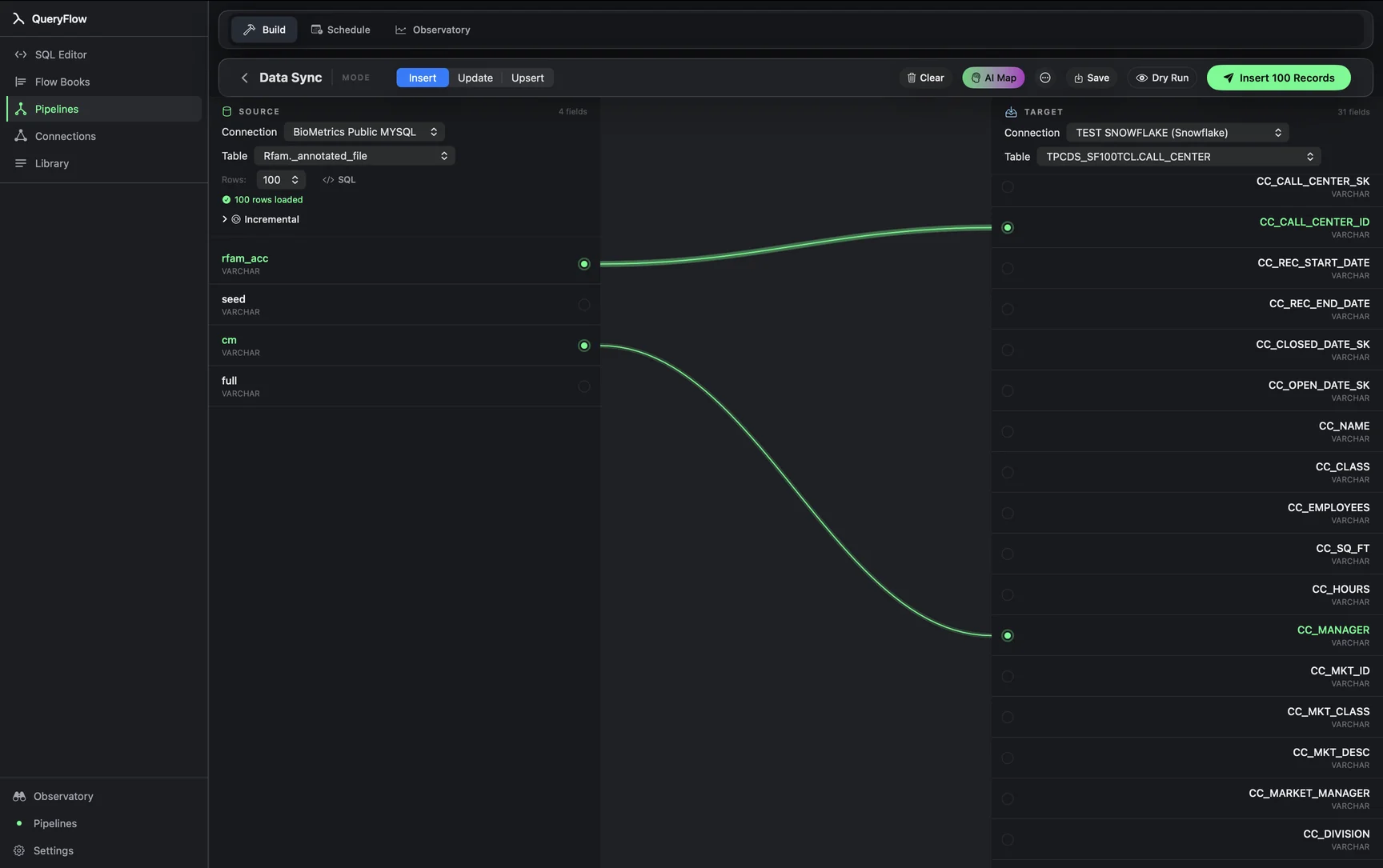
- Open Pipelines → Build and click New Sync.
- On the left, pick your Redshift Connection and Table, or write SQL against it.
- On the right, pick your BigQuery Connection and target Table.
- Drag from a source field to a target field, or click AI Map.
- Pick a MODE: Insert, Update, or Upsert.
- For Update or Upsert, choose a MATCH ON field.
- Click Dry Run, then Save it as a job or run it now.
A worked example
A company migrating its analytics workload off Redshift onto BigQuery wants a table synced over while both systems run in parallel during the transition. The Redshift source, using Redshift's schema-qualified syntax:
SELECT
  event_id,
  user_id,
  event_type,
  event_ts
FROM analytics.events
WHERE event_ts >= DATEADD(hour, -1, GETDATE());
The BigQuery target, project and dataset backticked:
`my-gcp-project.migration.events`
Map event_id, user_id, event_type, and event_ts, set MODE to Upsert, and MATCH ON to event_id. QueryFlow implements the BigQuery side of Upsert as a MERGE statement, so re-running the sync on overlapping windows (useful during a migration when you want to re-verify recent data) won't create duplicates.
Check it worked
Dry Run first, then compare row counts between the Redshift source and the BigQuery target directly with a COUNT(*) on each side for the same time window, since a genuine warehouse migration is exactly the situation where a silent row-count mismatch matters most.
Troubleshooting
| If you see | Fix |
|---|---|
| No BigQuery connections available | Add one under Databases first, with a service account that has BigQuery Data Editor on the target dataset. |
| Job fails on write | Check the BigQuery service account has write access on the target dataset, and that column types are compatible (Redshift's SUPER type, for example, needs explicit handling). |
| Duplicate key values in source for key column(s) … | Pick a MATCH ON column, or combination, that's unique per row in the Redshift query. |
Where a managed migration tool still wins
If this is a genuine one-time warehouse cutover involving many tables, foreign key relationships, and a hard cutover date, a dedicated migration service or Google's own BigQuery Data Transfer Service tooling for Redshift can handle bulk historical loads and schema translation more completely than a field-mapped sync built one table at a time. Data Sync here is a better fit for an ongoing parallel-run period, syncing specific tables incrementally while both systems stay live, or for a smaller number of tables where building each sync by hand is fast enough not to need a dedicated migration tool.
Cost math against Fivetran's own pricing
A Redshift-to-BigQuery migration or parallel sync, run through a managed connector like Fivetran's, bills on the same MAR model as any other Fivetran connector: distinct rows touched by a change in a calendar month, per Fivetran's own definition, with a $5 base charge per connection and a free allowance up to 500,000 MAR total across connections, per Fivetran's pricing page. For a migration where the whole point is a temporary, finite parallel-run period rather than an indefinite managed pipeline, a flat-priced tool avoids paying for ongoing usage-based infrastructure for a job that has a planned end date. QueryFlow Pipelines runs $29.99/month or $199.99/year regardless of how many tables or rows the migration touches during that window.
Type mapping between Redshift and BigQuery
| Redshift type | BigQuery type | Note |
|---|---|---|
| INTEGER / BIGINT | INT64 | Direct mapping. |
| DECIMAL(p,s) | NUMERIC or BIGNUMERIC | Use BIGNUMERIC for precision beyond BigQuery's standard NUMERIC range. |
| TIMESTAMP | TIMESTAMP | Confirm whether the Redshift column is TIMESTAMP or TIMESTAMPTZ; Redshift distinguishes the two explicitly. |
| SUPER | JSON or STRING | Redshift's semi-structured type; flatten specific fields in the source query where possible rather than moving the whole SUPER value as opaque text. |
| VARCHAR(n) | STRING | No length limit concern on the BigQuery side. |
| BOOLEAN | BOOL | Direct mapping. |
SUPER columns are the one type worth extra care during a Redshift-to-BigQuery migration specifically, since Redshift's SUPER type supports nested paths and arrays that don't map cleanly onto a single BigQuery column type; extracting the specific nested fields you actually need with Redshift's own SUPER path syntax inside the source query, rather than moving the entire structure as raw text, usually produces a more usable BigQuery table.
Running the migration in phases
For a multi-table migration, syncing tables roughly smallest-to-largest lets you validate the mapping and mode choice on lower-risk tables before tackling a large fact table where a mistake is more expensive to redo. A common phased approach: sync dimension tables first with Insert mode for a one-time full load, verify counts, then move to fact tables with Upsert mode and an incremental filter for the parallel-run period, keeping both warehouses live until the BigQuery side has been validated against real downstream query results, not just row counts.
Monitoring the sync over time
During an active migration, checking the Observatory's run history daily rather than only when something looks wrong catches a partial failure early, before a week's worth of BigQuery data has silently drifted from the Redshift source. Once the parallel-run period ends and Redshift is decommissioned for this workload, the sync's job is typically either retired or kept running against Redshift's replacement destination if the migration continues to a further target.
A note on parallel-run duration
Most successful migrations run both warehouses in parallel for a defined window, often two to four weeks, long enough to validate a full reporting cycle (weekly and monthly rollups both complete at least once) before cutting downstream tools fully over to the BigQuery side and decommissioning the Redshift cluster or its associated compute.
A note on cost during the parallel-run window
Running both warehouses simultaneously means paying for both during the transition, Redshift's cluster or serverless compute alongside BigQuery's on-demand or reserved pricing, on top of whichever QueryFlow tier is doing the syncing; budgeting for that overlap period explicitly, rather than assuming costs drop the moment the sync is built, avoids an unpleasant surprise on the first combined invoice.
A note on network path during migration
If Redshift sits inside a VPC and BigQuery is reached over the public internet, confirm the Mac running QueryFlow (or the Mac mini left on as a scheduling server) has a network path to both, typically a VPN or bastion host into the VPC for Redshift and a straightforward outbound HTTPS connection for BigQuery's API; a migration plan that works on a laptop at the office can quietly stop working the moment the same job is scheduled to run from home without the same VPN connected.
Sources
- Fivetran Pricing (accessed September 26, 2026)
- Fivetran: Usage-Based Pricing (MAR definition) (accessed September 26, 2026)
Related syncs
See also: Integrations Load a CSV into BigQuery on Mac Sync Databricks to BigQuery.