Before you start
A working Databricks connection (personal access token or service principal) and a working BigQuery connection, both added under Databases, and a BigQuery dataset that already exists. Pipelines tier. Data Sync jobs run while QueryFlow is open, so keep the app running through your scheduled sync time.
Steps
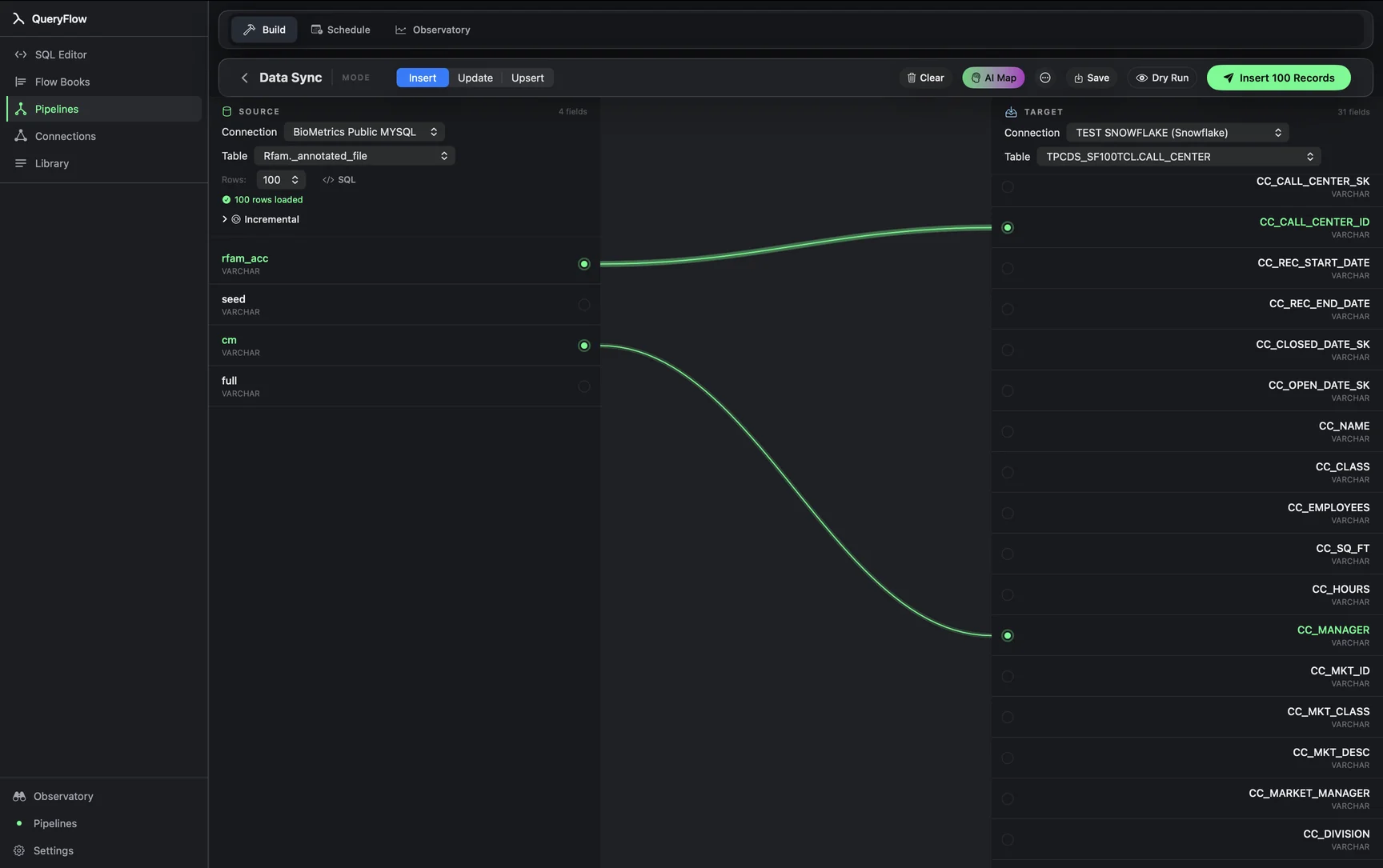
- Open Pipelines → Build and click New Sync.
- On the left, pick your Databricks Connection and Table, or write SQL against it.
- On the right, pick your BigQuery Connection and target Table.
- Drag from a source field to a target field, or click AI Map.
- Pick a MODE: Insert, Update, or Upsert.
- For Update or Upsert, choose a MATCH ON field.
- Click Dry Run, then Save it as a job or run it now.
A worked example
A company runs its machine-learning feature pipeline on Databricks but keeps its BI dashboards on BigQuery, and wants a scored-output table copied over nightly. The Databricks source, using Unity Catalog's three-level naming:
SELECT
  customer_id,
  churn_score,
  scored_at
FROM prod.ml_features.churn_scores
WHERE scored_at >= current_date() - INTERVAL 1 DAY;
The BigQuery target, project and dataset backticked:
`my-gcp-project.ml_outputs.churn_scores`
Map customer_id, churn_score, and scored_at, set MODE to Upsert, and MATCH ON to customer_id, so each day's re-scoring updates the same customer's row rather than accumulating a new one every run. QueryFlow implements this as a BigQuery MERGE against the matched key.
Check it worked
Dry Run first, watching the row count against how many distinct customers you expect scored that day. Databricks query results over 25 MB need a LIMIT or fewer columns before the sync can pull them cleanly, worth checking on a wide feature table before scheduling it.
Troubleshooting
| If you see | Fix |
|---|---|
| No Databricks connections available | Add one under Databases first (personal access token or service principal). |
| Job fails on write | Give the BigQuery service account BigQuery Data Editor on the target dataset. |
| Duplicate key values in source for key column(s) … | Confirm your Databricks query returns one row per customer_id for the day; a join that fans out rows will violate the MATCH ON key. |
Why teams run this pairing
Databricks' Spark engine and MLflow tooling suit model training and feature engineering; BigQuery's serverless query model suits ad hoc analysis and dashboards that need to scale without anyone managing compute. Rather than replatforming one workload onto the other's engine, Data Sync moves the specific tables that need to cross the boundary, the finished scores, not the training data or the notebooks that produced them.
Cost math against Fivetran's own pricing
Fivetran connects both Databricks and BigQuery as destinations and sources, metered the same MAR way: distinct rows changed per calendar month, per its own published definition, with a $5 base charge per connection and a free allowance up to 500,000 MAR. A daily-refreshed scoring table touching a defined customer base each day generates MAR roughly proportional to that customer count, which can sit comfortably inside Fivetran's free tier for a modest base or move into paid usage for a larger one, per the rates on Fivetran's own pricing page. QueryFlow Pipelines runs $29.99/month or $199.99/year flat regardless of how many customers get scored each day.
Type mapping between Databricks and BigQuery
| Databricks type | BigQuery type | Note |
|---|---|---|
| INT / BIGINT | INT64 | Direct mapping. |
| DECIMAL(p,s) | NUMERIC or BIGNUMERIC | Use BIGNUMERIC for precision beyond BigQuery's standard NUMERIC range. |
| TIMESTAMP | TIMESTAMP | Databricks TIMESTAMP is stored with an implicit session time zone; confirm what zone the cluster or warehouse assumes. |
| ARRAY<T> | ARRAY<T> | Both support native array types; confirm the element type maps cleanly. |
| STRUCT | STRUCT (RECORD) | Nested struct fields map to BigQuery's RECORD type; flatten specific fields in the source query if the destination table expects flat columns instead. |
| STRING | STRING | Direct mapping. |
Struct and array types are the ones most likely to need extra thought: both Databricks and BigQuery support nested and repeated fields natively, so a struct-to-struct mapping can work directly, but if the downstream BigQuery table is meant to feed a BI tool that expects flat columns, flattening specific nested fields in the Databricks source query (rather than trying to reshape a nested BigQuery RECORD after the fact) is usually the more maintainable approach.
Databricks-specific considerations
A Databricks SQL Warehouse that's set to auto-suspend after a period of inactivity needs to actually be running (or configured to auto-start on a query) for a scheduled sync to succeed; a warehouse that's suspended and set to require manual start will cause the sync to fail rather than wait, similar to a paused Redshift cluster. Checking the warehouse's auto-resume setting in Databricks before relying on an unattended overnight schedule avoids a predictable failure mode.
Monitoring the sync over time
Feature and scoring pipelines on the Databricks side tend to evolve, a data scientist adds a new feature column, renames an existing one, or changes a scoring model's output range. None of those changes propagate into the BigQuery target automatically; the field mapping stays exactly as drawn until someone opens the sync and updates it. Building a habit of checking the sync whenever the upstream Databricks notebook or job changes catches this before a stale mapping quietly drops a newly-added column from the BigQuery table.
A note on model versioning
If the churn-scoring model itself gets retrained and its score range or calibration shifts, that's invisible to Data Sync entirely, since the sync just moves whatever values the Databricks query returns; tracking which model version produced a given batch of scores (a model_version column included in the source query, for example) is worth building into the pipeline upstream if score comparability across model versions matters downstream.
A note on cost on both sides
Databricks bills for the SQL Warehouse compute a query consumes independent of anything QueryFlow charges, and BigQuery bills separately for the write; a frequent, high-volume sync is worth checking against both platforms' own usage dashboards periodically, the same way you'd monitor any regularly-run query's underlying compute cost, rather than assuming a scheduled job is free simply because the scheduling itself has no marginal cost in QueryFlow.
A note on comparing this to a dedicated MLOps pipeline
Teams with a mature MLOps setup often already have a dedicated feature-store or model-serving pipeline moving scores out of Databricks on its own schedule, in which case this sync is redundant with infrastructure that already exists; it's best suited to a team that has a working Databricks scoring job but hasn't yet built (or doesn't want to maintain) a separate delivery pipeline just to get those scores into a BigQuery-based BI tool, where a straightforward scheduled Data Sync closes that gap without adding a new piece of MLOps infrastructure to maintain.
One last habit worth building: after any change to the scoring notebook's output columns or either connection's credentials, run Dry Run once before trusting the next scheduled execution, rather than discovering a mismatch only when a downstream dashboard shows a gap.
Sources
- Fivetran Pricing (accessed September 26, 2026)
- Fivetran: Usage-Based Pricing (MAR definition) (accessed September 26, 2026)
Related syncs
See also: Integrations Load a CSV into BigQuery on Mac Load an Excel File into BigQuery..