Before you start
A working Postgres connection and a working BigQuery connection, both added under Databases, and a BigQuery dataset that already exists (QueryFlow writes to tables inside it, it doesn't create datasets). Pipelines tier, since Data Sync is a Pipelines feature.
Steps
- Open Pipelines → Build and click New Sync.
- On the left, pick your Postgres Connection and Table, or write a SQL query against it.
- On the right, pick your BigQuery Connection and target Table.
- Drag from a source field to a target field, or click AI Map.
- Pick a MODE: Insert, Update, or Upsert.
- For Update or Upsert, choose a MATCH ON field that's unique per row.
- Click Dry Run to preview, then Save it as a job or run it now.
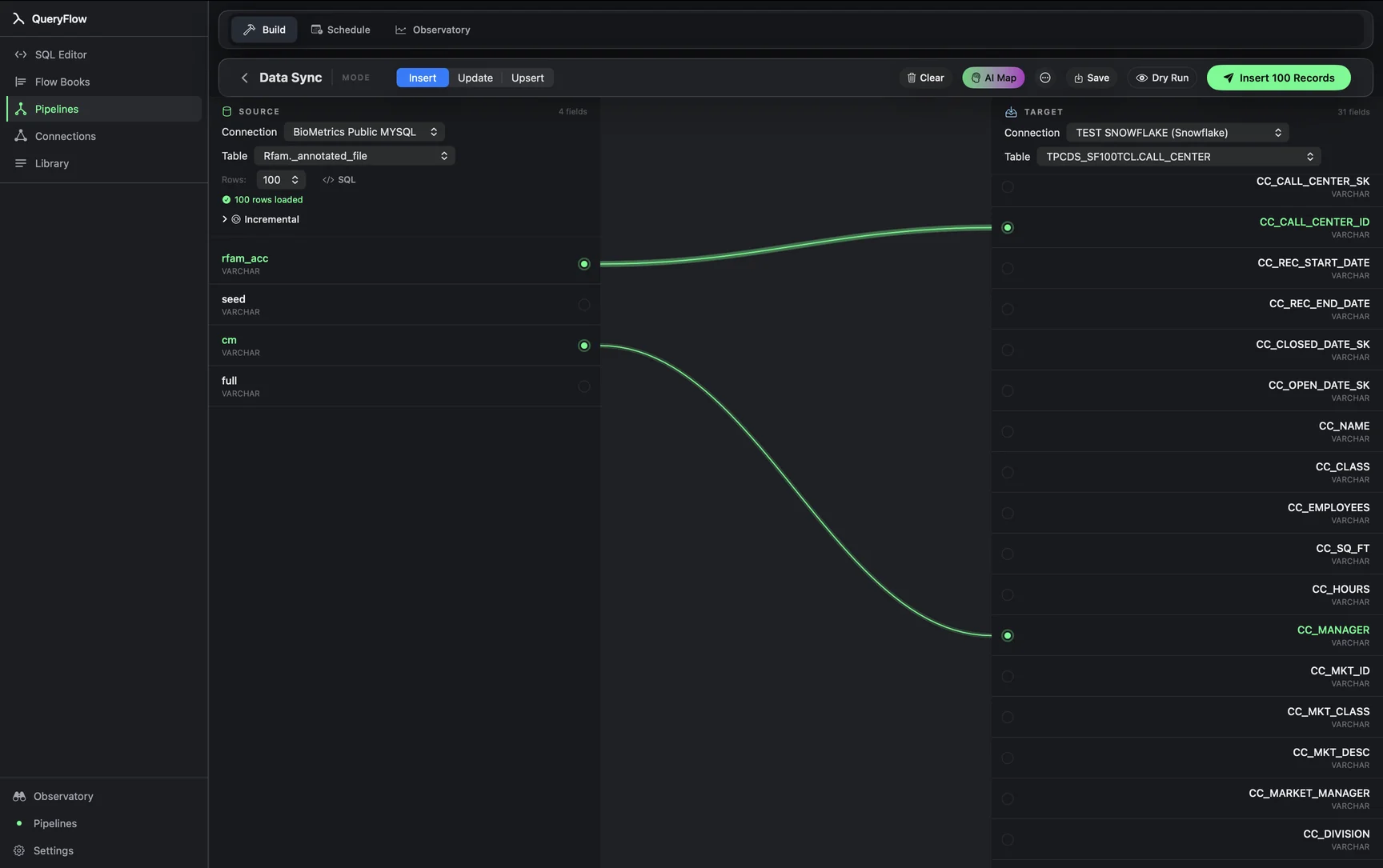
A worked example
A SaaS company keeps its orders table in Postgres and wants a daily rollup in BigQuery for the team already building dashboards there. The source query, run against Postgres:
SELECT
  order_date,
  customer_id,
  status,
  total_cents,
  updated_at
FROM public.orders
WHERE updated_at >= now() - interval '2 days';
The BigQuery target table, referenced the way BigQuery expects it, with the project and dataset spelled out and backticked because BigQuery table paths contain hyphens that break unquoted identifiers:
`my-gcp-project.analytics.orders_rollup`
Map order_date, customer_id, status, and total_cents to the matching BigQuery columns, pick Upsert, and set MATCH ON to a composite of order_date and customer_id (or just the order's primary key if you're syncing whole orders rather than a rollup). Under the hood this becomes a BigQuery MERGE, which is how QueryFlow implements Upsert against BigQuery targets: matched rows get updated, unmatched rows get inserted, in one statement rather than a separate delete-then-insert.
Check it worked
Run Dry Run first and confirm the row count looks right before committing to a live schedule. After a real run, query the BigQuery table directly and spot-check a handful of rows against the Postgres source, and check the run history in the Observatory for anything that failed silently on a type mismatch.
Troubleshooting
| If you see | Fix |
|---|---|
| No BigQuery connections available | Add one under Databases first, with a service account that has BigQuery Data Editor if you're writing new rows. |
| Job fails on write | Check the service account or Google account has BigQuery Data Editor on the target dataset, not just Job User and Data Viewer. |
| Duplicate key values in source for key column(s) … | Your MATCH ON column, or combination, isn't unique per row in the Postgres query. Narrow the query or add a column to the match. |
Where this replaces Fivetran or Airbyte
A managed Postgres-to-BigQuery connector from Fivetran or Airbyte buys you continuous log-based replication and a hosted pipeline you don't have to keep running. QueryFlow buys you a flat price and a pipeline you can see and edit directly, at the cost of running on a schedule rather than streaming, and needing your Mac (or a Mac left on as a server) available for the sync to fire, since Postgres syncs aren't in the list of jobs the background helper runs with QueryFlow fully closed — that list is Snowflake, Redshift, BigQuery and Databricks jobs only. If a five-minute or hourly cadence is fine for the destination table, that tradeoff is usually a non-issue; if you need true log-based CDC with sub-minute freshness and zero tolerance for the Mac being asleep, that's a real reason to stay on a managed connector.
What this costs against Fivetran's own numbers
Fivetran prices connectors by Monthly Active Rows (MAR): distinct primary keys that see an insert, update, or delete in a calendar month, counted once no matter how many times that same row changes again that month. Fivetran's own pricing page lists a $5 base charge per standard connection plus per-MAR usage, with the free plan covering 500,000 MAR before any charge applies. A single Postgres orders table with a few hundred thousand actively-changing rows a month can sit inside the free tier or land in Fivetran's lower usage bands; a busier one with several million MAR moves into paid usage that scales with row activity, not with anything QueryFlow charges for. QueryFlow's Pipelines tier is $29.99/month or $199.99/year flat, with no per-row metering at all — the price doesn't change whether the orders table has ten thousand rows or ten million, only how long the sync takes to run.
A note on schema drift
If a column gets added to the Postgres orders table after the sync is built, QueryFlow doesn't silently pick it up and add it to the BigQuery target. The field mapping stays as drawn until you open the sync and add the new field yourself. That's a deliberate tradeoff: a mapping you can see and edit, rather than an automatic schema-drift handler that occasionally reshapes a production table without asking.
Type mapping between Postgres and BigQuery
| Postgres type | BigQuery type | Note |
|---|---|---|
| INTEGER / BIGINT | INT64 | Direct mapping, no precision loss. |
| NUMERIC(p,s) | NUMERIC or BIGNUMERIC | Use BIGNUMERIC if precision exceeds BigQuery's NUMERIC range (38 digits). |
| TIMESTAMP WITH TIME ZONE | TIMESTAMP | BigQuery's TIMESTAMP is always UTC internally; confirm the source column's zone before mapping. |
| JSONB | JSON or STRING | Native JSON type preserves structure; STRING is safer if you plan to parse it downstream yourself. |
| BOOLEAN | BOOL | Direct mapping. |
| TEXT / VARCHAR | STRING | No length limit concerns on the BigQuery side. |
Get the type mapping wrong on a first run and the failure is usually loud, a rejected write with a clear type-mismatch error, rather than silent corruption, since BigQuery enforces column types on load rather than coercing loosely.
Handling nulls and large tables
Postgres NULL values come through as BigQuery NULL without extra configuration, which matters for the MATCH ON column specifically: a null value in a MATCH ON field won't reliably match itself across runs the way you'd expect from equality logic, so avoid using a nullable column as your key. For a Postgres table in the tens of millions of rows, the first full sync (before any incremental filter narrows it) can take a while depending on both Postgres read throughput and BigQuery's load API; narrowing the initial run with a date range and backfilling in chunks is usually faster and easier to monitor than one enormous first pass.
Monitoring the sync over time
Once a sync is scheduled, the Observatory dashboard shows every run's duration, row count, and outcome, which is worth checking periodically even after the sync has been reliable for months, since a source schema change or a permissions rotation on the BigQuery side can cause a run to start failing without anyone noticing until a downstream dashboard looks stale. A quick habit worth building: after any change to the Postgres orders table's columns, or any BigQuery service account credential rotation, re-run Dry Run once before trusting the next scheduled run.
A note on retries
If a scheduled run fails partway through, for example a transient network blip between your Mac and BigQuery, QueryFlow surfaces the failure in the run history with the underlying error rather than silently marking it successful, and a retry re-runs the same source query fresh rather than trying to resume mid-write, so a failed run is safe to simply retry once whatever caused it (a dropped connection, an expired token) is fixed.
Sources
- Fivetran Pricing (accessed September 26, 2026)
- Fivetran: Usage-Based Pricing (MAR definition) (accessed September 26, 2026)
Related syncs
See also: Integrations Load a CSV into BigQuery on Mac Sync Databricks to BigQuery.