Before you start
A working Postgres connection and a working Redshift connection (IAM keys) added under Databases, and a Redshift table already created with the target columns. Pipelines tier. Redshift is on the background helper's supported list; Postgres is not, so the sync needs QueryFlow open, or a Mac left running, to fire unattended.
Steps
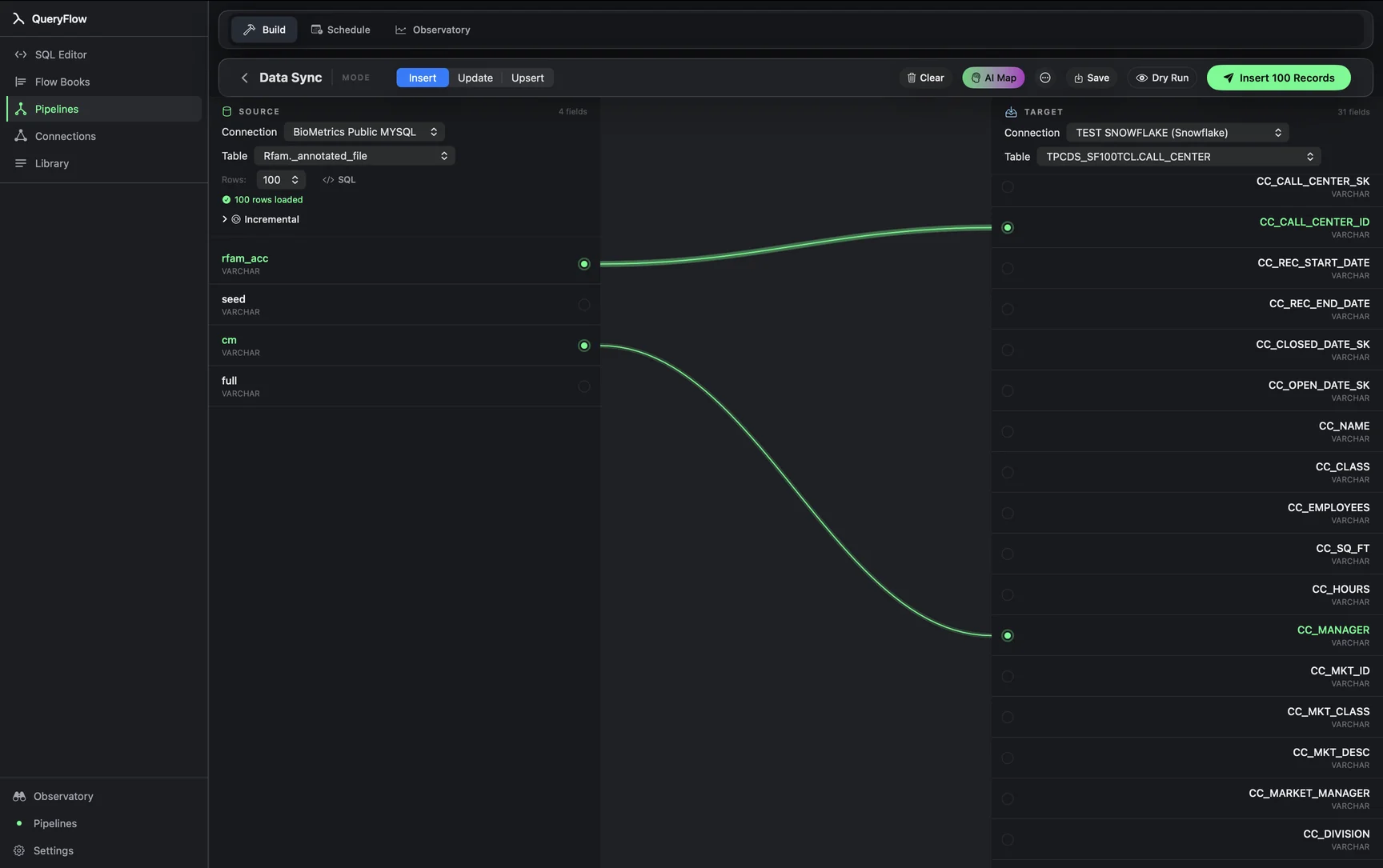
- Open Pipelines → Build and click New Sync.
- On the left, pick your Postgres Connection and Table, or write SQL against it.
- On the right, pick your Redshift Connection and target Table.
- Drag from a source field to a target field, or click AI Map.
- Pick a MODE: Insert, Update, or Upsert.
- For Update or Upsert, choose a MATCH ON field.
- Click Dry Run, then Save it as a job or run it now.
A worked example
An operations team wants a daily copy of a Postgres inventory table landing in Redshift, where the rest of the company's BI tooling already points. The Postgres source:
SELECT
  sku,
  warehouse_id,
  quantity_on_hand,
  updated_at
FROM public.inventory
WHERE updated_at >= now() - interval '1 day';
The Redshift target, schema-qualified the way Redshift (a Postgres-derived engine) expects:
analytics.inventory
Map sku, warehouse_id, quantity_on_hand, and updated_at, set MODE to Upsert, and MATCH ON to a composite of sku and warehouse_id, since inventory is tracked per SKU per location. Redshift doesn't support a single native upsert statement the way Postgres does; QueryFlow handles this by staging the incoming rows and running a delete-then-insert against the matched keys inside a transaction, giving you upsert semantics without you writing that staging logic by hand.
Check it worked
Dry Run first. After a live run, query the Redshift table and spot-check counts against Postgres for the same warehouse and SKU combinations, and watch for any numeric precision differences if a Postgres NUMERIC column maps to a narrower Redshift DECIMAL definition.
Troubleshooting
| If you see | Fix |
|---|---|
| No Redshift connections available | Add one under Databases first, using IAM keys with write access to the target schema. |
| Job fails on write | Confirm the IAM role or user has INSERT and DELETE privileges on the target table (Redshift's upsert path uses a staged delete-and-insert). |
| Duplicate key values in source for key column(s) … | Pick a MATCH ON column or combination that's unique per row, for example sku plus warehouse_id together rather than sku alone. |
Where a managed connector still wins
If Postgres change volume is high and downstream Redshift consumers need near-real-time freshness, a log-based CDC connector avoids both the polling overhead of repeated WHERE-clause queries against a busy production table and the interval-driven lag a scheduled sync has by design. For a daily or hourly inventory rollup, that gap rarely matters in practice, and the tradeoff is a simpler setup with no replication slot to provision or maintain on the Postgres side.
Cost math against Fivetran's own pricing
Per Fivetran's own MAR definition, an inventory table like this one generates MAR proportional to how many distinct SKU/warehouse rows actually change quantity in a given month, not how often the sync runs. Fivetran's pricing page lists a $5 base charge per connection plus per-MAR usage across a 1–1,000,000 MAR band, with a free allowance up to 500,000 MAR. A moderately active inventory table can sit inside or just past that free tier depending on turnover; QueryFlow Pipelines is $29.99/month or $199.99/year flat either way, with the sync running as often as the schedule allows at no extra usage cost.
Type mapping between Postgres and Redshift
| Postgres type | Redshift type | Note |
|---|---|---|
| INTEGER / BIGINT | INTEGER / BIGINT | Direct mapping; Redshift's type system is Postgres-derived. |
| NUMERIC(p,s) | DECIMAL(p,s) | Match precision and scale exactly to avoid silent rounding on write. |
| JSONB | SUPER or VARCHAR | Redshift's SUPER type handles semi-structured data closer to Postgres JSONB than a plain VARCHAR would. |
| TIMESTAMP WITH TIME ZONE | TIMESTAMPTZ | Redshift supports this type explicitly; confirm the target column uses it rather than a zone-naive TIMESTAMP. |
| TEXT | VARCHAR(65535) | Redshift VARCHAR has a maximum length; very long text values may need truncation logic upstream. |
The VARCHAR length ceiling is the detail most likely to surprise someone moving from Postgres, where TEXT columns are effectively unbounded; a Postgres column holding occasional long-form text (a notes field, a JSON blob stored as text) needs its Redshift target sized deliberately, and values exceeding that width will need truncation or a redesign of what gets synced.
Redshift-specific performance considerations
Redshift's columnar storage and distribution key model mean write performance for the sync's target table depends partly on how that table's DISTKEY and SORTKEY are defined, a decision made when the table is created, not something Data Sync controls. For an Upsert-heavy sync running frequently against a large target table, choosing a DISTKEY that aligns with your MATCH ON column (when practical) keeps the staged delete-and-insert pattern QueryFlow uses for Redshift upserts running efficiently rather than triggering a full table scan on every run.
Monitoring the sync over time
Redshift clusters can be paused to save cost when not actively queried; a scheduled sync hitting a paused cluster will fail outright rather than waiting, so if cost-saving pause schedules are in use elsewhere in the organization, coordinate the sync's schedule to run only while the cluster is confirmed to be live, or check the Observatory's run history for a pattern of failures that lines up suspiciously well with a known pause window.
A note on why Redshift lacks native upsert
Redshift's columnar, distributed storage model makes a true in-place row update more expensive than it is on a row-oriented database like Postgres, which is part of why AWS never added a single-statement MERGE or ON CONFLICT equivalent the way Postgres has; the staged delete-and-insert pattern QueryFlow runs under the hood is the standard, AWS-recommended workaround for this exact limitation, not a workaround unique to QueryFlow.
A note on VACUUM and table maintenance
Because Upsert mode on Redshift deletes and re-inserts rows rather than updating them in place, a frequently-run sync against a large target table can accumulate dead rows the way any delete-heavy Redshift workload does, making a periodic VACUUM on the target table worth scheduling separately if the sync runs often enough for that to matter at your table's scale.
A note on connection pooling
A frequently-scheduled sync opening a fresh Postgres connection on every run is rarely a problem at typical sync intervals, but if the same Postgres instance is also serving a busy application with its own connection pool near its configured maximum, adding several very-short-interval scheduled syncs on top can occasionally contend for available connections; checking Postgres's max_connections setting against your total connection count, application plus scheduled jobs, avoids a surprising connection-refused error during a busy period.
One last habit worth building: after any change to either connection's credentials, run Dry Run once before trusting the next scheduled execution, rather than discovering a stale token the next time someone checks the target table.
Sources
- Fivetran Pricing (accessed September 26, 2026)
- Fivetran: Usage-Based Pricing (MAR definition) (accessed September 26, 2026)
Related syncs
See also: Integrations Load a CSV into Redshift. Sync MySQL to Redshift..