Before you start
A working MySQL connection and a working Postgres connection, both added under Databases, and a Postgres table already created with the columns you're syncing into. Pipelines tier.
Two different jobs that look the same
"MySQL to Postgres sync" usually means one of two different things, and they call for different setups. One is an ongoing sync, keeping a Postgres copy current for a team that's standardized on Postgres for reporting while the app still runs on MySQL. The other is a one-time migration, moving off MySQL for good. QueryFlow handles the first well: build the sync once, schedule it, done. For the second, treat the sync as a bulk data mover and be honest that connections, users, and any MySQL-specific SQL in the app itself get re-added or rewritten by hand afterward — Data Sync moves rows, it doesn't migrate an application's dependency on MySQL.
Steps
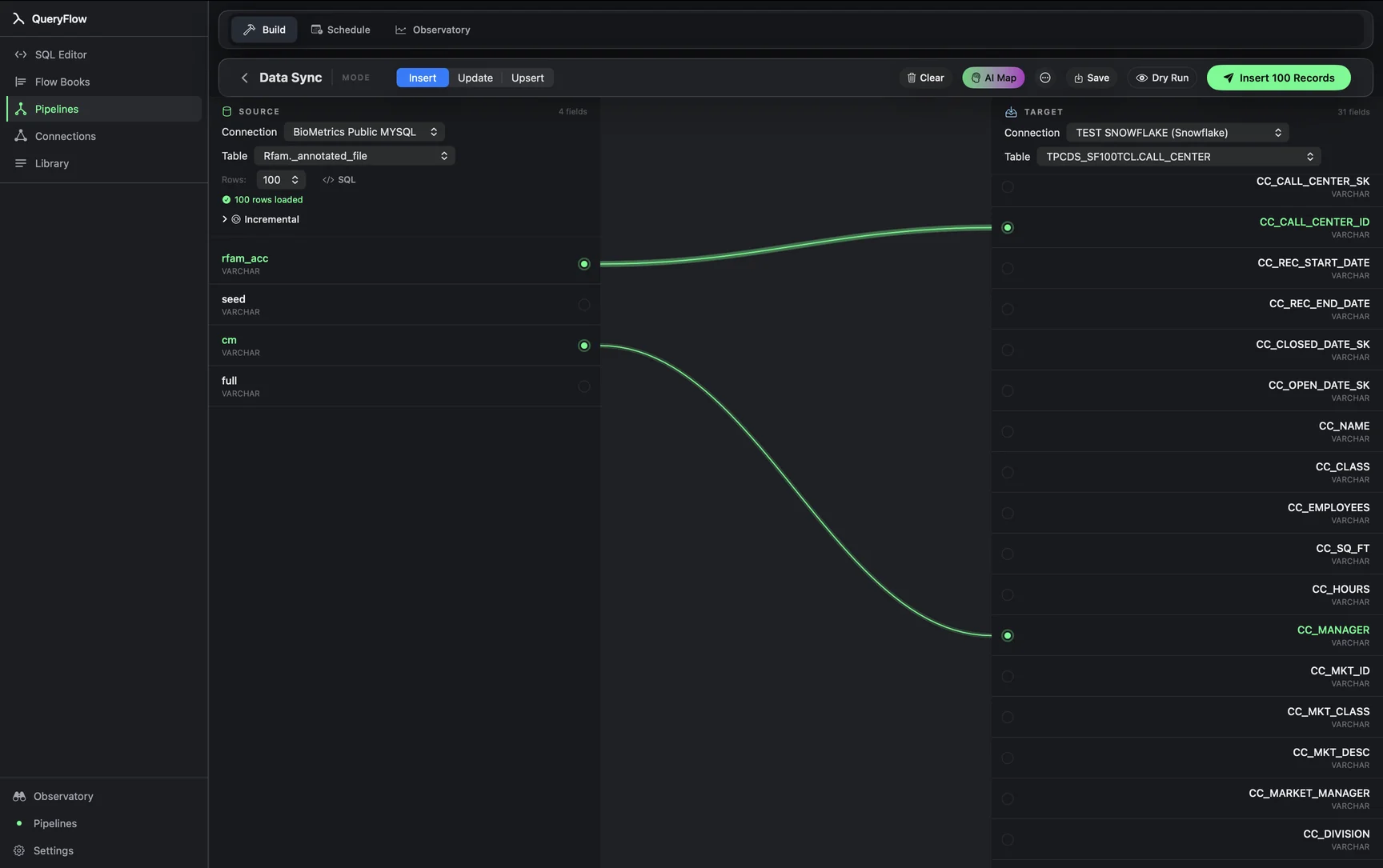
- Open Pipelines → Build and click New Sync.
- On the left, pick your MySQL Connection and Table, or write SQL against it.
- On the right, pick your Postgres Connection and target Table.
- Drag from a source field to a target field, or click AI Map.
- Pick a MODE: Insert, Update, or Upsert.
- For Update or Upsert, choose a MATCH ON field.
- Click Dry Run, then Save it as a job or run it once for a migration.
A worked example
A team running a MySQL-backed app wants a nightly copy of its customers table in Postgres, where the rest of their reporting already lives. The MySQL source query:
SELECT
  id,
  email,
  plan_tier,
  created_at,
  updated_at
FROM customers
WHERE updated_at >= NOW() - INTERVAL 1 DAY;
The Postgres target, a plain schema-qualified table reference, no special quoting needed unless a column or table name is mixed-case or reserved:
public.customers
Map id, email, plan_tier, and the two timestamp columns, set MODE to Upsert, and MATCH ON to id, since MySQL's auto-increment primary key and a Postgres integer primary key line up cleanly. Under the hood, QueryFlow implements Postgres Upsert with INSERT ... ON CONFLICT (id) DO UPDATE, which is the native way Postgres handles this rather than a separate delete-then-insert pass.
Check it worked
Dry Run first to confirm the row count and catch any type mismatch before it writes. After a live run, query the Postgres table directly and compare row counts and a handful of individual rows against the MySQL source, particularly any text columns using a different collation between the two engines.
Troubleshooting
| If you see | Fix |
|---|---|
| Records synced, with errors listed | Usually a type mismatch, most often a MySQL TEXT or ENUM column landing on a narrower Postgres column. Widen the target column or map to TEXT. |
| Duplicate key values in source for key column(s) … | Pick a MATCH ON column, or combination, that's unique per row in the MySQL query. |
| Choose at least one key field | Update and Upsert both require a MATCH ON column. Switch to Insert if you genuinely want every row appended, duplicates included. |
Where this replaces Fivetran or Airbyte, and where it doesn't
For an ongoing MySQL-to-Postgres feed at a small-to-medium scale, a scheduled sync covers the same ground a managed connector would, at a flat price instead of a metered one. What it doesn't do is streaming replication: Fivetran and Airbyte both offer log-based CDC options for MySQL that pick up row changes continuously rather than on an interval, which matters if downstream consumers need sub-minute freshness or if the source table sees enough write volume that even a five-minute batch window falls behind. For a nightly or hourly cadence feeding reports or a data warehouse, the interval-based approach here is simpler to reason about and doesn't require running or paying for a replication slot.
Cost math against Fivetran's published pricing
Fivetran meters this kind of connector by Monthly Active Rows: distinct primary keys touched by an insert, update, or delete in a calendar month, counted once regardless of how many times that row changes again. Fivetran's pricing page lists a $5 base charge per standard connection with usage billed across a 1–1,000,000 MAR band, and its free plan covers up to 500,000 MAR with no charge at all. A customers table with a few hundred thousand actively-changing rows a month can sit inside that free allowance; a busier one moves into paid MAR tiers that scale with row activity. QueryFlow Pipelines is $29.99/month or $199.99/year flat, with no MAR metering, so the price is the same whether the customers table has a thousand rows or several million — only the run time changes.
Type mapping between MySQL and Postgres
| MySQL type | Postgres type | Note |
|---|---|---|
| INT / BIGINT | INTEGER / BIGINT | Direct mapping. |
| DECIMAL(p,s) | NUMERIC(p,s) | Keep precision and scale identical to avoid silent rounding. |
| DATETIME | TIMESTAMP | MySQL's DATETIME has no time zone; confirm which zone your application assumes before mapping to a TIMESTAMPTZ column. |
| ENUM('a','b') | TEXT or a Postgres ENUM | A Postgres ENUM you've predefined preserves the constraint; TEXT is the simpler default. |
| TINYINT(1) | BOOLEAN | MySQL often uses TINYINT(1) as a boolean; map explicitly rather than leaving it as a small integer. |
| VARCHAR(n) | VARCHAR(n) or TEXT | Match the length constraint if it matters to your application, or widen to TEXT if not. |
The DATETIME-to-TIMESTAMP mapping is the one most worth double-checking: MySQL stores DATETIME values exactly as written with no zone conversion, while a Postgres TIMESTAMPTZ column stores everything normalized to UTC internally and converts on display. If the MySQL application writes local server time into a DATETIME column without any zone awareness, syncing it into a TIMESTAMPTZ column can shift the displayed time depending on the reading session's zone setting, unless you explicitly cast it in the source query first.
Handling large tables and a one-time cutover differently
For an ongoing sync, an incremental WHERE clause on updated_at keeps each run's payload small regardless of the table's total size. For a one-time migration, run without that filter once to move the full table, verify counts on both sides, and only then decide whether to also stand up an ongoing incremental sync for the transition period before MySQL is fully decommissioned. Doing the full pull during low-traffic hours avoids adding read load to a production MySQL instance during business hours, particularly on a table with a large number of rows and no useful index on the column you're filtering by.
Monitoring after the cutover
If this sync is feeding an ongoing reporting need rather than a one-time migration, check the Observatory's run history periodically for anything that started failing quietly, most often after someone adds a column to the MySQL side without updating the field mapping, or after a MySQL user's password rotates without the QueryFlow connection being updated to match.
A note on retries
A run that fails partway, say MySQL dropped the connection mid-query, shows up in the run history with the actual driver error rather than a generic failure message, and retrying re-issues the source query from scratch rather than attempting to resume a partial result set, so it's safe to simply retry once the underlying issue (a network blip, an expired credential) is resolved.
Sources
- Fivetran Pricing (accessed September 26, 2026)
- Fivetran: Usage-Based Pricing (MAR definition) (accessed September 26, 2026)
Related syncs
See also: Integrations Load a CSV into PostgreSQL. Excel to Postgres on Mac.